Jay Sen Lon
June 22, 2026


When your client drops off a month's worth of handwritten receipts in Thai script, you're looking at hours of manual typing before anything hits Xero. Thai accounting firms deal with this every week because Thailand's informal economy runs on paper, and those handwritten slips are legally valid source documents the Revenue Department expects you to retain and process. Tofu changed what that work looks like: upload the handwritten invoices, the AI reads Thai script and extracts supplier names, dates, line items, and totals, maps each transaction to your chart of accounts, and publishes everything to Xero automatically. Your bookkeeper reviews and posts. The data entry step disappeared. As Tammy Tan at Klozer put it, "What used to take me 3-4 hours can be done in 30-60 minutes."
TLDR:
Thailand's informal economy runs on paper. Street vendors, small contractors, and family-run suppliers across Bangkok, Chiang Mai, and every province in between issue handwritten receipts and invoices as standard practice, not as an exception. Informal businesses in Thailand are almost always small-scale and operate without digital systems. For accounting firms serving small and medium Thai businesses, this is simply the document reality they work with every day.
The reasons are structural. Many Thai SMEs operate without accounting software of their own. A mechanic in Nonthaburi, a fabric wholesaler in Pratunam, or a catering company in Phuket may produce dozens of handwritten receipts weekly because that's how their business has always operated, and there's no regulatory pressure pushing them toward digital invoicing at the transaction level.
Thai tax compliance adds another layer. The Revenue Department requires firms to retain source documents, including handwritten ones, for audit purposes. So even when a client eventually digitizes their reporting, the paper trail stays. Accounting firms have to process what their clients actually send them.
There are a few consistent patterns worth knowing:
None of this is going away. Thai government digitization efforts focus on VAT-registered large businesses, leaving the long tail of SME transactions in paper form for the foreseeable future.
Thai script presents a genuinely different set of problems for document processing tools built around Latin-alphabet assumptions.

The script is written without spaces between words, which means standard tokenization methods that rely on whitespace to identify word boundaries simply don't work. AI document processing reads context instead of pixel-matching, but a tool trained primarily on English or European invoices has no reliable way to segment Thai text into meaningful units, let alone extract supplier names, line-item descriptions, or tax amounts from it accurately.
The gap widens considerably when handwriting enters the picture. Printed Thai already challenges conventional OCR tools. Handwritten Thai introduces variation in character form, stroke connection, and spacing that makes recognition far harder.
A few factors compound this:
For a Bangkok accounting firm processing supplier receipts from local vendors, these aren't edge cases. They're the everyday documents sitting in the inbox every morning.
| Tool | Thai Handwriting Support | Line-Item Extraction | Multi-Client Firm Design |
|---|---|---|---|
| Tofu | Reads handwritten Thai script natively with contextual reconstruction when characters are ambiguous | Extracts every line item with supplier details, tax fields, and automatic chart of accounts mapping | Built for multi-client accounting firms with unlimited users and clients per subscription |
| HubDoc | Traditional OCR struggles with Thai handwriting due to non-linear vowel placement and character stacking | Header and total only, skips line-item extraction across all document types | Designed as a document inbox for single businesses feeding data to accountants |
| Dext | Traditional OCR struggles with Thai handwriting due to non-linear vowel placement and character stacking | Line-item extraction available but charges extra credits per document processed beyond header capture | Supports multi-client workflows but uses per-document credit pricing that scales with volume |
| AutoEntry | Traditional OCR struggles with Thai handwriting due to non-linear vowel placement and character stacking | Line-item extraction available but charges extra credits per document processed beyond header capture | Supports multi-client workflows but uses per-document credit pricing that scales with volume |
| DOKKA | Traditional OCR struggles with Thai handwriting due to non-linear vowel placement and character stacking | Extracts line items but was not architected for accounting firms managing multiple client portfolios | Built for single businesses managing their own documents, not multi-client accounting practices |
Traditional OCR reads what it can see. It scans pixels, matches shapes to characters, and outputs whatever it finds, which works reasonably well for printed, high-contrast text in a known font. Handwriting breaks that model almost immediately. The character shapes vary by person, ink bleeds into paper fibers differently depending on pen type, and a receipt that got wet once is now effectively unreadable to a rules-based system.
AI document processing works differently. Instead of matching pixel patterns to a fixed character library, it interprets documents the way a trained reviewer would: by understanding context. If the character shape is ambiguous, the surrounding words and numbers narrow down what it likely says. A Thai handwritten receipt with a partially smudged total can still be read correctly because the line items above it, the tax rate, and the supplier name all point toward the right figure.
There are a few specific ways this plays out in practice for accounting firms:
The practical difference for a Thai accounting firm goes beyond accuracy on any single document. It is the reduction in the correction queue across a whole client portfolio, week after week.
Thai accounting firms working with handwritten invoices need to extract several distinct data fields before anything can land correctly in Xero. The challenge is that handwritten documents rarely follow a consistent layout, so the extraction process has to account for structural variation across every document.
There are three broad categories of data that matter here.
These are the fields that tell Xero who the invoice is from and when the transaction occurred:
Thailand's 7% VAT regime means every invoice needs its tax fields extracted and mapped correctly. That includes:
This is where most manual processes fall short. A handwritten invoice from a Bangkok materials supplier might list 20 individual items, each needing its own line-item detail with account code mapping. Getting the header and total is table stakes. Getting every line item, correctly coded to the chart of accounts, is what makes month-end reconciliation actually work.
Thai clients send documents through whatever is already in their hand. A Bangkok supplier photographs an invoice and sends it over WhatsApp. A retailer drops off a stack of paper receipts at the end of the month. A freelancer emails a handwritten note with the total circled in pen.
There are three practical ways Thai accounting firms get these documents into Xero:
Each method feeds the same pipeline. Tofu extracts the line items, maps them to your chart of accounts, and publishes the transaction to Xero.
Thai accounting firms handle a document type that most bookkeeping automation tools quietly skip: handwritten receipts and invoices written in Thai script. A market vendor receipt, a hand-filled purchase order from a regional supplier, a manually written tax invoice from a sole trader: these show up constantly in Thai bookkeeping workflows, and they have historically meant one thing: manual re-entry.
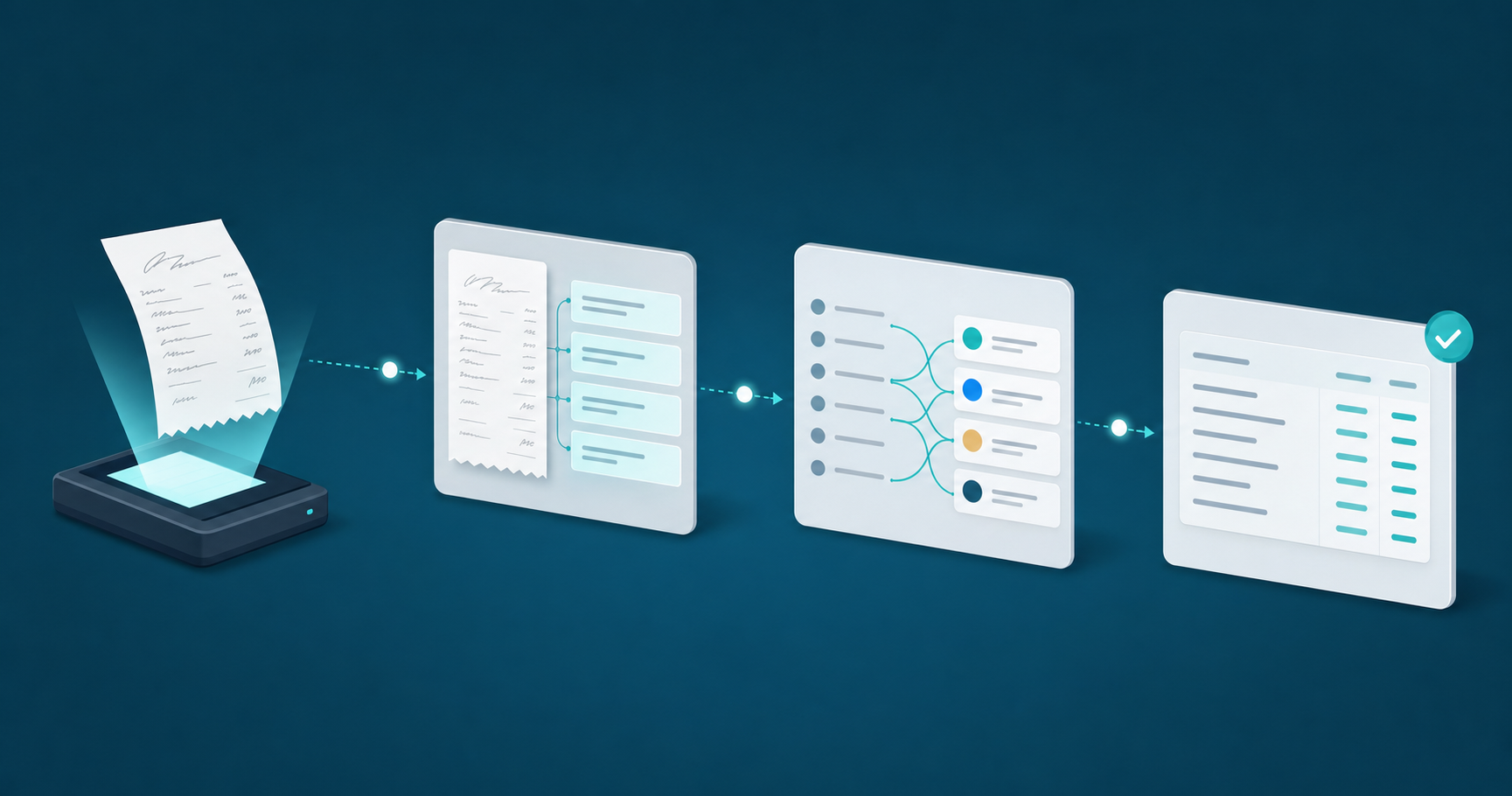
Tofu processes these documents through a multi-step workflow that runs before anything touches Xero.
When a handwritten Thai document is uploaded to Tofu, the workflow runs in this sequence:
The review step stays with your team. Tofu extracts and codes; your bookkeeper confirms and posts. That division of work is intentional: the judgment stays human, the typing does not.
Each time your team corrects a coding decision inside Tofu, that correction feeds back into a knowledge engine tied to your firm's specific clients, suppliers, and chart of accounts. The AI doesn't reset between jobs. It learns which Thai supplier names map to which expense categories, how your firm codes freight charges versus professional fees, and which VAT treatments apply to which document types.
Over the first few weeks of processing, corrections made during review reduce manual intervention considerably as volume grows. A receipt from a Bangkok logistics company that needed adjustment on week one gets coded correctly on week three, without anyone touching it.
The learning isn't generic. It's scoped to your firm's actual data.
This is why firms processing high volumes of handwritten Thai receipts see accuracy improve considerably over a short period. The starting point isn't zero, but the gap between first-pass accuracy and production-ready accuracy closes faster than most firms expect.
Thai handwriting varies widely across age groups, regions, and individual styles, and that variation creates predictable problems when AI processes documents without proper context.
A few accuracy issues come up repeatedly:
Tofu handles these patterns by learning from corrections you make early on. When you fix a misread character or remap an abbreviated term to the right account, that correction gets applied to future documents from the same supplier. After a few weeks of corrections, manual review reduces considerably as the document volume grows.
The one scenario worth flagging: photos taken in poor lighting or at sharp angles will produce lower accuracy regardless of which AI document processing tool you use. For handwritten receipts in particular, a flat, well-lit scan or camera shot gives the AI the clearest signal to work with before it ever tries to extract a line item.
Before Tofu can publish extracted data from handwritten receipts and invoices into Xero automatically, your Xero organisation needs to be configured correctly for Thai accounting workflows. Skipping this setup is the most common reason firms see mismatched entries, rejected bills, or uncoded transactions after processing.
There are three areas worth getting right before you process your first document.
Tofu learns your chart of accounts over time, but it needs a clean foundation to learn from. Thai accounting firms typically maintain accounts in both Thai and English inside Xero. Make sure your account names are consistent, because Tofu reads existing coded transactions to build its coding suggestions. Accounts with duplicate names or inconsistent formatting slow that learning process considerably.
Thailand's standard VAT rate is 7%. Inside Xero, confirm you have a tax rate named and configured correctly for Thai VAT, and that it is applied consistently across your supplier contacts. When Tofu extracts VAT from a handwritten receipt, it maps to whatever tax rate exists in your Xero organisation. If your tax rate setup is inconsistent, you will see mismatched tax lines on published bills.
Tofu matches extracted supplier names to existing contacts in Xero. The more complete your contact list before you start, the higher your out-of-the-box coding accuracy. For Thai suppliers with names in both Thai script and romanised form, set up the contact with the name as it appears most frequently on your incoming documents.
Thailand's Revenue Department rolled out its e-Tax Invoice and e-Receipt system in phases starting in 2020, and by 2026 the compliance expectations for Thai accounting firms have grown considerably more detailed. The core requirement is that VAT-registered businesses issue invoices with a digital signature or QR code that can be verified against the Revenue Department's records. That digital-first mandate sounds like it would make document processing easier, but in practice, it creates a two-track reality that firms deal with every day.
Smaller suppliers, market vendors, and sole traders across Thailand still issue handwritten receipts as their primary proof of transaction. These documents are legally valid for expense claims and VAT input credit purposes under Thai tax law, but they sit entirely outside the e-Tax system. Your clients hand you a stack of them at month-end alongside their digital invoices, and your team has to process both.
This split creates a specific processing problem:
The compliance layer matters here too. Thai accounting standards require that supporting documents match the entries in your client's VAT returns. A misread date or a transposed amount on a handwritten receipt becomes a discrepancy that surfaces during a Revenue Department audit, not simply a data entry error. Getting handwritten documents right the first time is the actual job.
Thai VAT rules require more than a supplier name and a total. For every purchase above 5,000 THB, the Revenue Department expects a full tax invoice: the seller's VAT registration number, the buyer's details, a per-line breakdown of goods or services, and the 7% VAT calculated separately for each line.
When a receipt arrives handwritten, that breakdown sits buried in ink that standard OCR tools can't parse reliably. You're left re-entering each line manually into Xero, then verifying the VAT calculation yourself before the monthly PP.30 filing.
Three specific problems follow an incomplete extraction:
Full line-item extraction isn't a quality-of-life improvement for Thai firms. It's the difference between a clean VAT audit trail and a filing that doesn't hold up.
The word limit is 83 words. Rewrite this section to be within the word limit. Shrink the content down to what's most valuable and preserve the structure.
Thai VAT rules require more than a supplier name and a total. For purchases above 5,000 THB, the Revenue Department requires full invoices: the seller's VAT registration number, buyer details, a per-line breakdown, and 7% VAT calculated separately per line.
When a receipt arrives handwritten, that breakdown is buried in ink. Standard OCR tools can't parse it reliably, so you re-enter each line manually into Xero before the monthly PP.30 filing.
Thai accounting firms deal with a specific document problem that most accounting software wasn't built to solve: handwritten receipts from market vendors, informal suppliers, and small businesses are everywhere in Thailand's cash-heavy economy. A client drops off a stack of 40 handwritten slips after a month of purchases. Someone has to read each one, decode the Thai script, find the amount, identify the vendor, and type it into Xero. That's the job as it currently exists.
Tofu changes what that job looks like. You upload the receipts, and Tofu extracts every field automatically, then publishes the data directly to Xero. Handwritten Thai script is read the same way a printed invoice would be.
The process has a few distinct steps worth understanding before you set it up:
The review step still exists. Tofu doesn't remove your judgment from the process; it removes the typing.
Your Bangkok clients will keep sending handwritten receipts from market vendors and small suppliers because that's the document reality of Thailand's informal economy, and you'll keep needing to process them correctly for VAT compliance. Tofu extracts line items from Thai handwriting, maps them to your chart of accounts, and publishes the coded entry to Xero so your team confirms instead of types. The learning happens fast: corrections you make in week one reduce your review queue by week three. Try Tofu on handwritten receipts and see how the workload changes.
No, and that's by design. Tofu extracts handwritten Thai script automatically, but you review and confirm each entry before it posts to Xero. You're a reviewer now, not a typist. First-pass accuracy is lower for unfamiliar suppliers and improves with each invoice from the same vendor as the AI learns your coding patterns.
Upload the receipt (photo, scan, or PDF), and Tofu reads the Thai handwriting to extract supplier name, date, line items, and VAT amounts. The system maps each field to your chart of accounts based on how you've coded similar documents before, then publishes the coded transaction directly to Xero for your review. The more you process, the more accurately it codes without input from you.
Traditional OCR matches pixels to characters and fails when Thai handwriting stacks vowels vertically above and below consonants. Tofu interprets documents using context: if a character is illegible, surrounding words and the document structure narrow down what it likely says. For Thai receipts, contextual reconstruction fills gaps that OCR abandons.
Supplier name in Thai script, supplier tax ID (13 digits for VAT-registered vendors), invoice number, invoice date, pre-tax subtotal, 7% VAT amount, grand total, and full line-item detail including description, quantity, unit price, and account code mapping for each line. Thai VAT rules require per-line breakdown for purchases above 5,000 THB to support input tax credit claims during Revenue Department audits.
Thailand's e-Tax system applies to VAT-registered businesses, but street vendors, small contractors, and family-run suppliers across Bangkok, Chiang Mai, and every province issue handwritten receipts as standard practice because they operate without accounting software. These paper documents remain legally valid for expense claims and VAT input credit under Thai tax law, so accounting firms process what their clients actually send them.