Bank Statement Extraction, Rebuilt From the Ground Up


Extraction Was Never the Hard Part

Splitting accounts and currencies by hand

Coding after extraction, not during it

No way to catch an error until reconciliation fails

CSV as the missing link
Upload the PDF. Tofu does the coding, the checking, and the posting.

From Statement to Posted Entry

Multi-account, multi-currency, handled natively

Account code, tax rate, and tags per line, double-entry intact

Multi-level validation, before anything reaches you

Direct to Xero, no CSV
What's New?
Five upgrades that take a statement from PDF to posted entry.
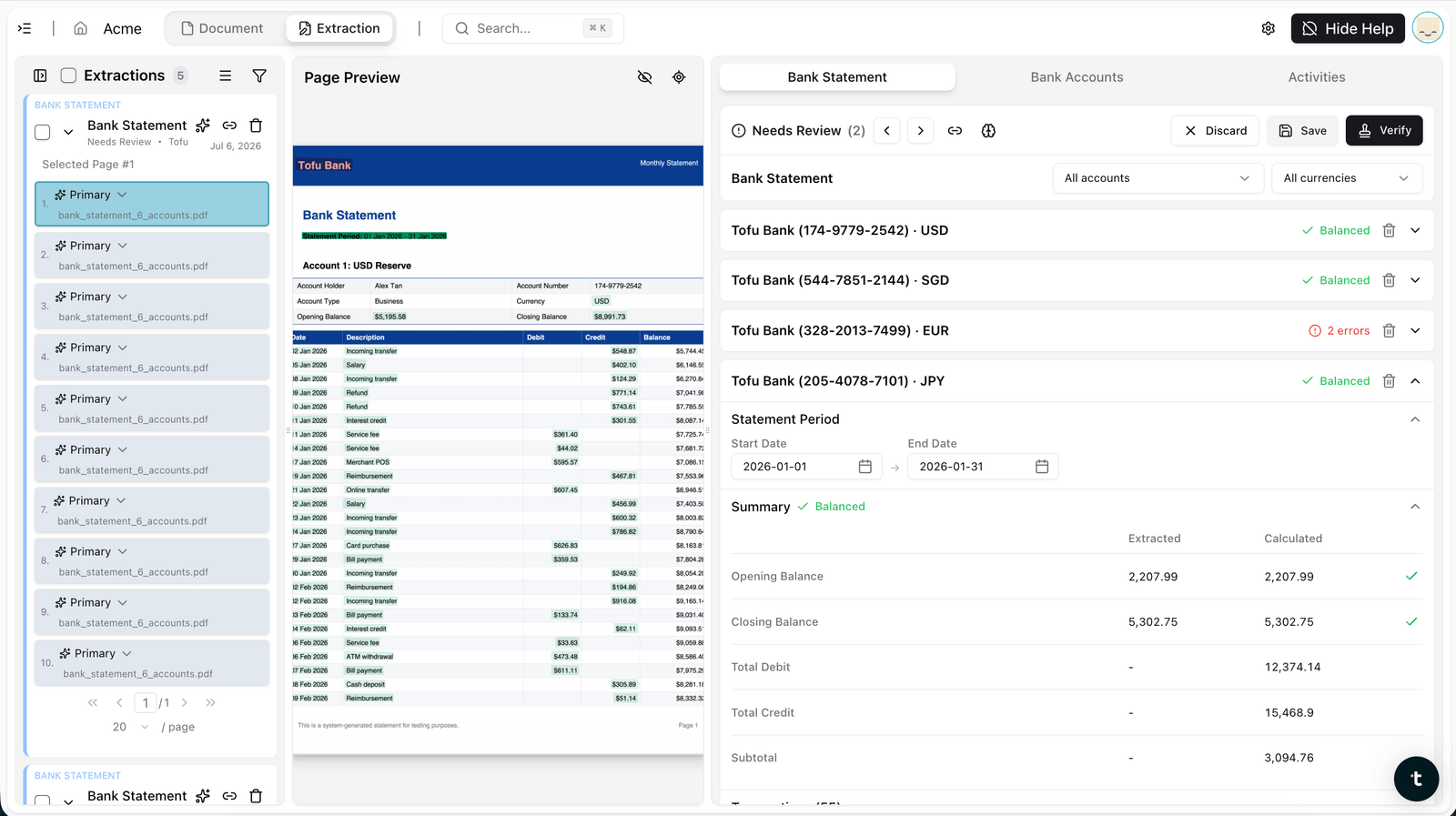
Multi-account, multi-currency in one upload
A single statement with several accounts or currencies gets split, matched, and converted correctly. USD, SGD, EUR, and JPY accounts from one file, each balanced independently.
Automatic line-level coding
Account code, tax rate, and tags extracted per transaction. Not just what happened and for how much, but how it should be coded, automatically.
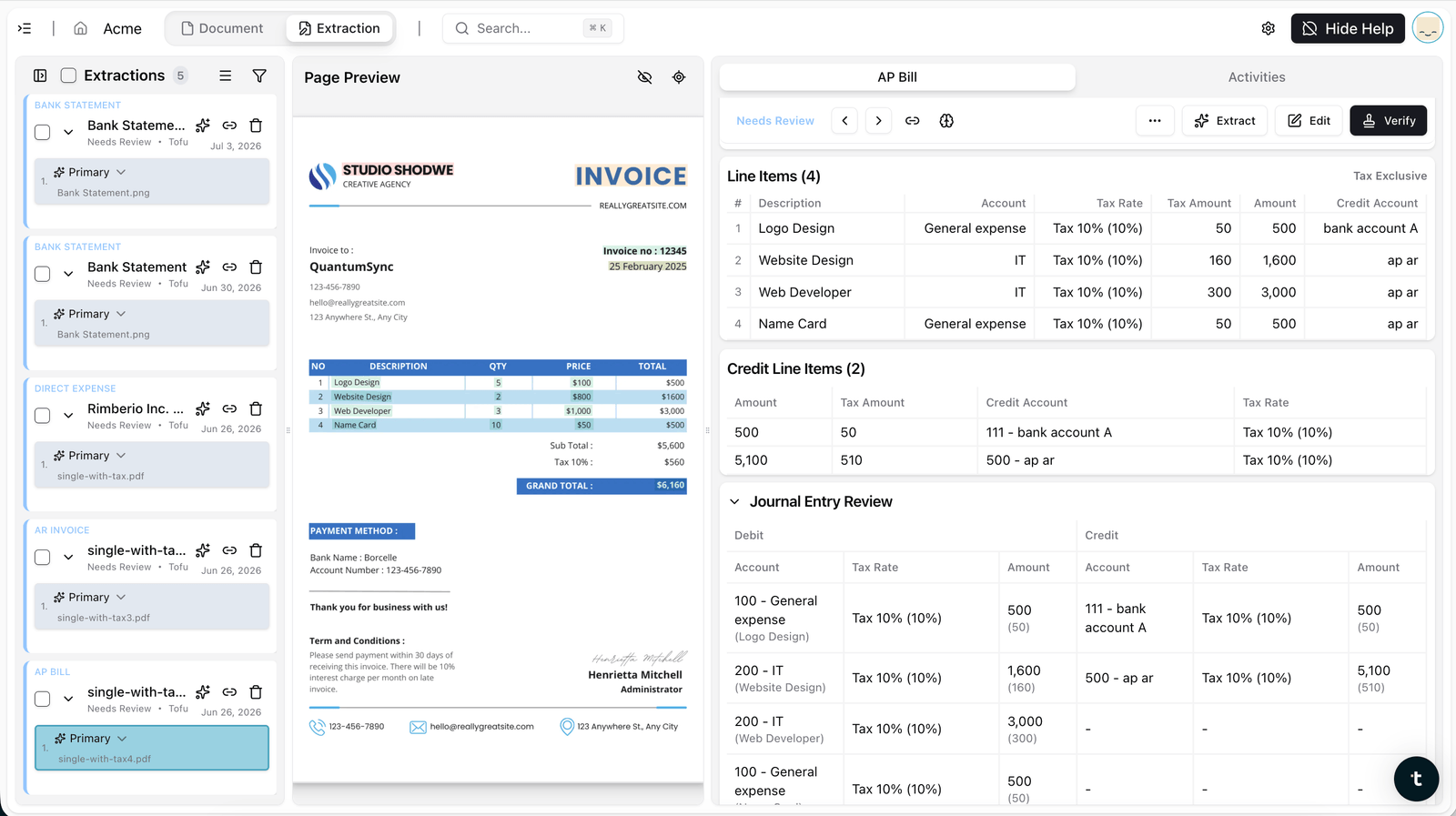
Double-entry support
Parent and child lines keep their relationship intact, with a full journal entry review of debits and credits, instead of collapsing into a single flat row.
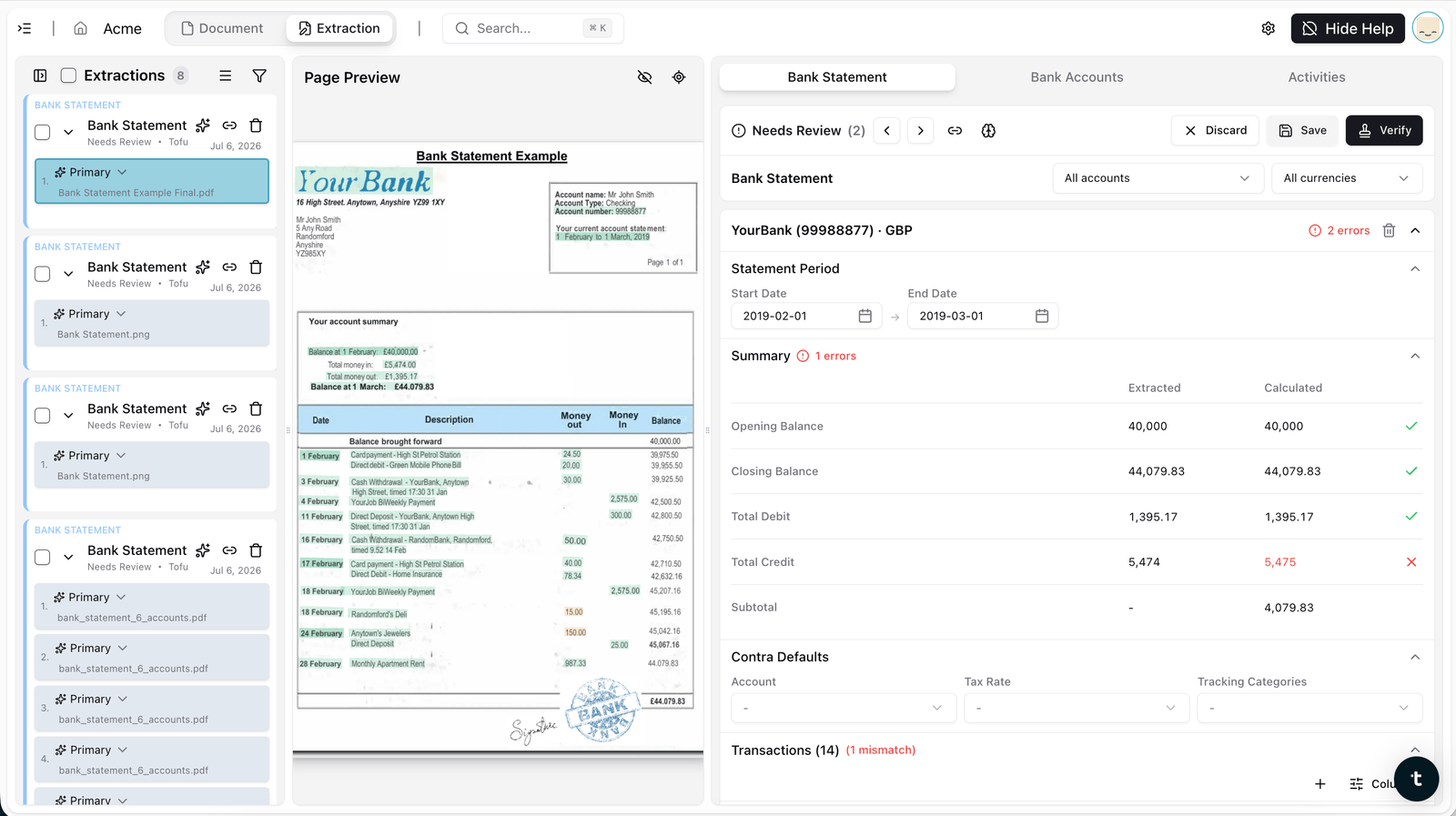
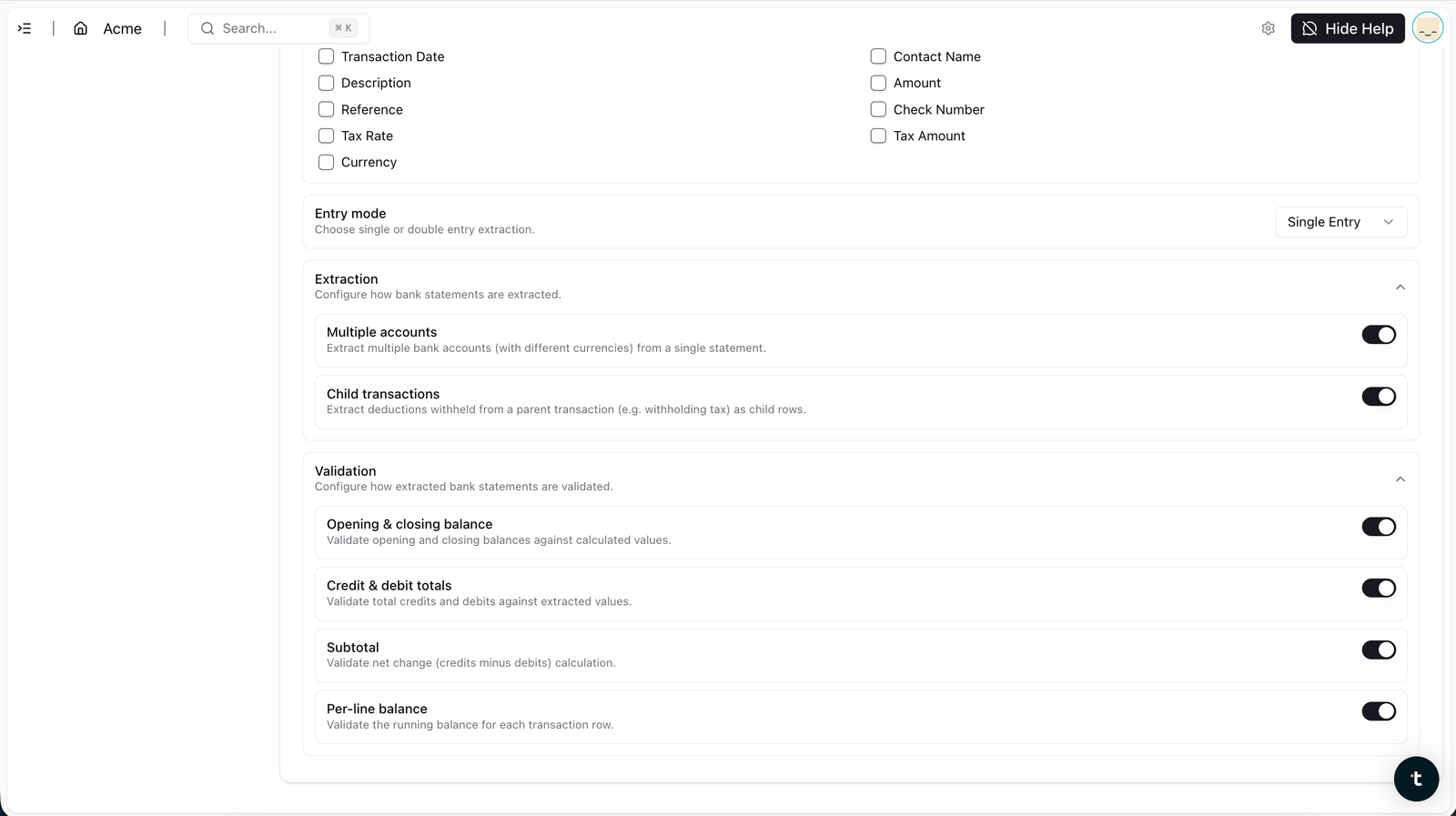
Four-point validation before anything is handed back
Opening and closing balances, transaction dates, credit and debit totals, and per-line running balances, all checked. If something doesn't reconcile, Tofu re-extracts rather than handing you a broken file.
Direct Xero posting
The extracted, coded, validated entry posts straight into Xero. No export, no reformat, no re-import.
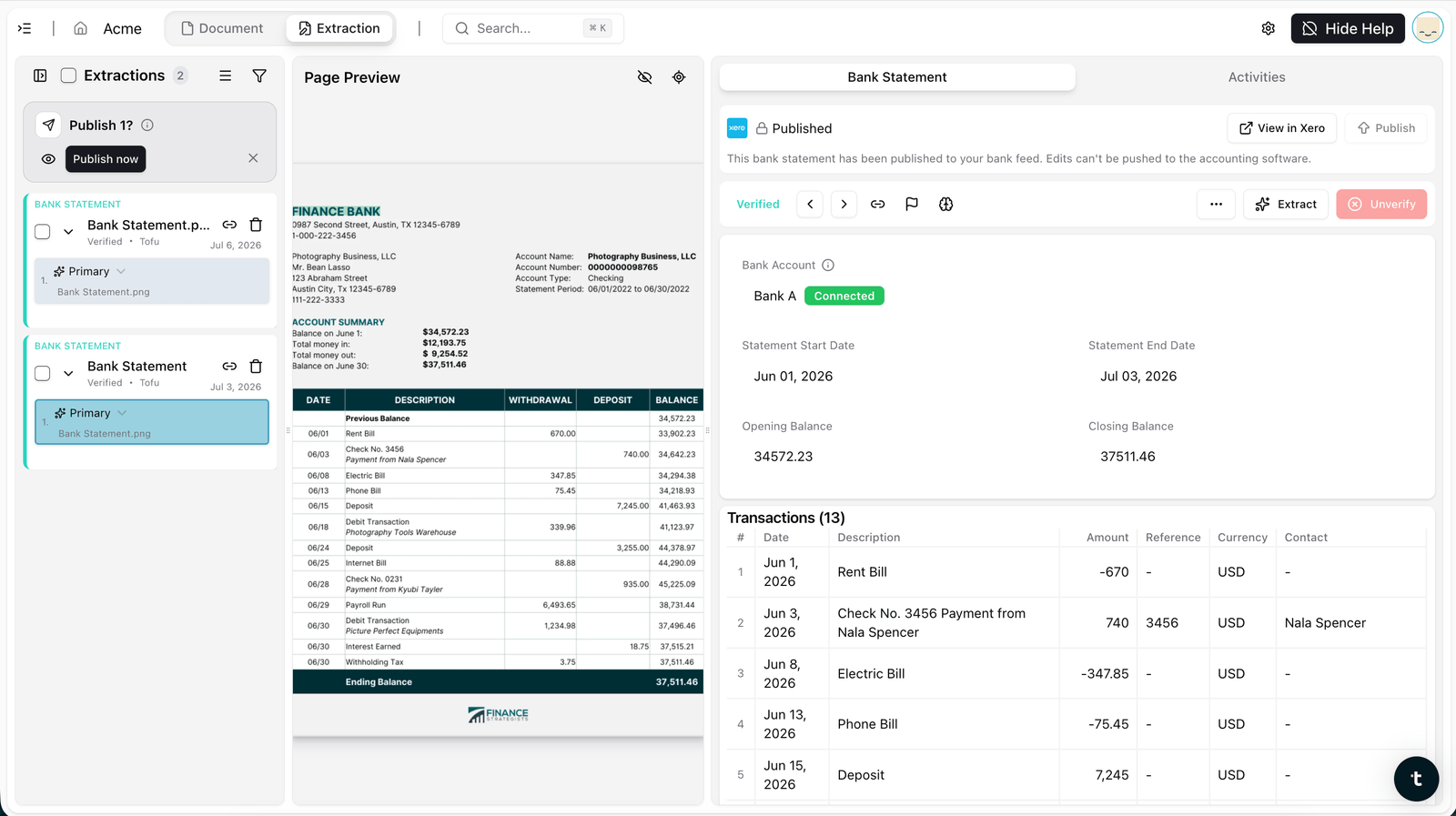
How It Works, in Four Steps
No templates or format settings. Drop any bank statement, including multi-account and multi-currency files, and Tofu extracts, codes, validates, and posts straight to Xero.
Step 1: Upload
Drop any bank statement PDF into Tofu, any bank, any country, any length, including multi-account and multi-currency statements in a single file.
Step 2: Extract and Code
Tofu reads every transaction, date, description, amount, reference, and debit or credit, then assigns account code, tax rate, and tags per line, preserving double-entry and child-transaction structure.
Step 3: Validate
Opening and closing balances, transaction dates, credit and debit totals, and per-line running balances are checked automatically. Click any field to see exactly where it came from on the original statement.
Step 4: Post
One click sends the validated entry straight into Xero. No CSV, no manual import.
What makes Tofu different
| Capability | Tofu | Vendor A | Vendor B | Vendor C |
|---|---|---|---|---|
| Extract rows to CSV | Yes | Yes | Yes | Yes |
| Per-entity coding to client's own COA, tax, tags (double-entry / child transactions) | Yes, self-learning from the GL | Partial, receipts and invoices only | Partial, learns nominal and VAT codes | Rule based only |
| Multi-account plus multi-currency in one statement | Yes (revamp) | No, rejects multi-account | No | Splits multi-account, not multi-currency native |
| Validation and AI agentic self-correction loop | Yes, re-extracts until math ties | No | Balance check only | Balance check only |
| Multilingual plus handwriting (200+ languages) | Yes | No, English centric | No, English centric | No, English and Latin |
| Pricing | Flat rate, unlimited users and entities | Per client, costly at scale | Credit based, statements cost more | Tiered |
Frequently Asked Questions
It now handles multi-account and multi-currency statements natively, extracts account code, tax rate, and tags per transaction, supports double-entry with child transactions, and posts directly to Xero without a CSV step.
Yes. A single upload can contain several accounts and currencies, correctly split and converted.
It codes each line, account code, tax rate, and tags, so the output is postable, not just readable.
Tofu checks opening and closing balances, transaction dates, credit and debit totals, and per-line running balances before anything is handed back. If it doesn't reconcile, it re-extracts.
No. Validated entries post directly to Xero.
Yes, tested past 1,000 pages in a single upload, with no page limits.
Plans start at $79/month and include a monthly extraction allowance. Bank statement pages each count as one extraction. Xero integration is free, with unlimited users on every plan.
Yes. Parent and child lines keep their relationship intact, with a full journal entry review of debits and credits, instead of collapsing into a single flat row.
No. Upload any bank statement from any bank or country. Tofu adapts automatically — no templates, format settings, or configuration required.
How bookkeepers like you use Tofu
Among all the software we have been using, it's the best that I have. I don't know if there is something on the market even better than Tofu. But I'm not looking for it.

"Now with Tofu, because it's line by line, my P&L at the end of the month is a lot more accurate. Which is fantastic."

Tofu is very simple. It's very easy to navigate and use. It's beginner friendly. Even without a finance or accounting background, you can use it. It's effective, it's efficient, and it's really time saving.

"It's the extraction, and the way that it remembers what it's supposed to be doing with everything. Somebody actually remembers what you tell it to do."
"I was totally mind blown. I knew it was going to be a game changer. I told all my managers: literally all the clients, small, large, we could all transition into Tofu. It's probably the only software right now that caters for Xero Ledger subscriptions."

"I allocated three people for these three clients before. With tofu, one person can handle these three clients."
.png)
"I was already dreaming of a tool that could capture receipt data automatically. tofu delivered exactly that even for Philippine BIR compliance. I can totally advocate."

"Tofu is magic in that I can pull in all my invoices, slips, and heaven knows what else is thrown at me, extract the information, edit the invoices, and Tofu remembers all that!

"tofu takes that one scan and it individualizes it and it goes into your accounting system. Whereas a transaction will take you a minute, minute and a half, it takes seconds."
.png)
"tofu is a game-changer because of its zero-configuration AI.
It has effectively turned our junior staff from data-entry clerks into data reviewers."

"It saves our team more than 50% of our bookkeeping time. Definitely worth the investment. Once you get tofu trained, you don't have to worry for the rest."

"tofu is one of the best apps I've ever come across. You upload your bank statement and it takes less than five minutes. You have no idea the joy that tofu gives me."

"I can tell tofu exactly what to pick up and how to code things, and it actually learns. The interface is clean, reviewing is quick, and I don't need to stress over screens anymore.
That's what made me stick with tofu over Dext."
.png)
“tofu is not an additional tool, it's a must-have for every accountant. Every accountant in the world needs to upgrade their skills. If they just focus on being a freelancer doing things the old way, they'll be old school."

"We were trying to push Dext for line item extraction for about two years, but nothing came out. Our fees kept increasing. It was time to look for something new."

"With tofu, they can save more time and go back on time. No need to always spend overtime just to close the bookkeeping."
"When there's a bookkeeping task, we ask ourselves: 'Can you tofu it?' If you can, please just load it in. Don't think."

"Instead of typing all day, our staff is now thinking about compliance, audits, and how to advise clients properly."

"One of the few apps which totally addresses problems faced by bookkeepers. Very practical for day to day work."

We have found tofu to be highly beneficial for our bookkeeping processes, as it significantly enhances both efficiency and overall effectiveness.

"We have been using tofu for a few months now, and we are very happy with the support provided by the team. It has significantly helped us improve both the quality and efficiency of our bookkeeping."

"I’ve recently implemented tofu for our invoice processing workflow, and it has quickly proven to be one of the most efficient automation tools we’ve added to our Xero stack.
The setup was incredibly fast, and the interface is clean, intuitive, and easy for the team to adopt."

“Before using tofu, it would take me between 3 to 4 hours to input and review a client’s invoices. With tofu, I can now complete the process in just 30 to 60 minutes, saving me a significant amount of time.”

“tofu made me a fan! An actual AI-first, automated process with hassle-free setup. One of the smartest teams behind the product. Highly recommended.”