Jay Sen Lon
March 2, 2026

Your invoice automation grabs the total and stops. You're still typing descriptions, quantities, account codes, and tax rates for every single line because Hubdoc line item extraction isn't on the roadmap and most OCR tools treat your 25-line invoice like one lump sum. Real line item extraction reads row 12 separately from row 13, codes them to different accounts, applies the right tax, and lets you review instead of re-type. We'll walk through the five tools that actually extract at the line level, how AI learns your coding patterns without configuration, and why per-document pricing gets expensive fast when you're processing 200 invoices monthly.
TLDR:
Line item extraction reads every individual line on an invoice, going beyond the header information to capture full details. When you process an invoice in Xero, you need descriptions, quantities, unit prices, account codes, and tax treatment for each line.
Most automation tools stop at the header. They capture the supplier, invoice date, and total. Then you're back to typing. A 30-line wholesale invoice with mixed product categories, different tax rates, and varying account codes? You're still entering all 30 lines manually.
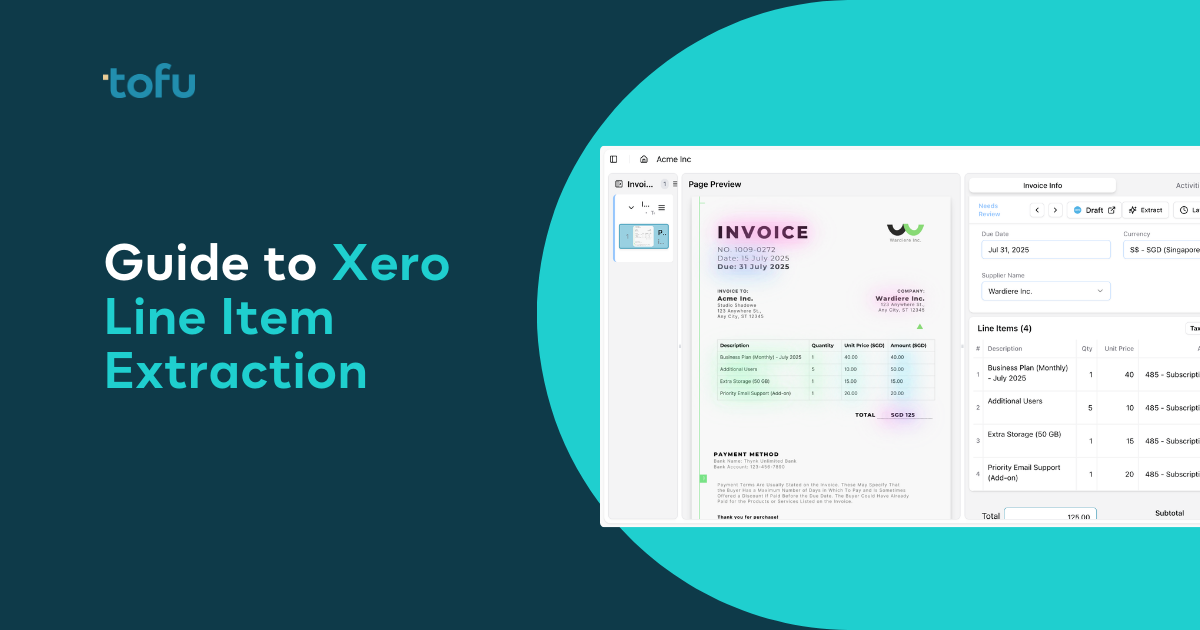
Full line item extraction means every row gets read and coded automatically. The description from line 12, the quantity from line 12, the account code for line 12 all get captured and matched to your Xero chart of accounts. Review the extraction, correct anything the AI missed, and publish.
Job costing requires line-level detail to track project profitability. Inventory management needs quantities and item codes at the line level. Tax compliance depends on accurate line item categorization, especially when invoices mix taxable and exempt items. Audit trails break down when you only have invoice totals without supporting line detail.
Hubdoc captures header-level data when processing invoices for Xero. You get the supplier name, invoice number, date, and total amount. That information creates a draft bill in Xero with a single line item showing the full invoice total.
The line-by-line detail doesn't come through. If your supplier invoice has 15 products with different account codes, tax rates, and descriptions, Hubdoc creates one line in Xero with the sum. You open that draft bill and type each line manually.
Xero has confirmed on their product ideas forum that line item extraction is not on the roadmap for Hubdoc. If you need this capability, look into a Hubdoc alternative. The tool was designed for document capture and basic data pull, not detailed line-level processing.
Manual invoice processing takes 15 minutes when you account for data entry, validation, and approval routing. If you're processing 200 invoices monthly with Hubdoc, you're still spending 50 hours on line item entry. The capture step is automated. The coding step isn't.
Five tools offer line item extraction for Xero with different approaches to pricing, setup, and capability.
| Tool | Pricing Model | Line Items Included | Setup Approach | Xero Integration | Language Support | Xero App Store Rating |
|---|---|---|---|---|---|---|
| Dext | Per user + per document | Extra cost | Manual rules | Native | English + European languages | 4.1 stars |
| Datamolino | Per document | Included | Manual rules | Native | 40+ languages | 4.8 stars |
| EzzyBills | Per document | Included | Manual rules | Native | English, limited others | 4.5 stars |
| DocuClipper | Per document | Included | Manual rules | Native | English only | 4.3 stars |
| Tofu | Flat monthly (unlimited users) | Included | AI learns from history | Native | 200+ languages + handwriting | 5.0 stars |
Dext charges separately for line item extraction on top of base pricing. Setup requires building extraction rules before processing documents. Datamolino and EzzyBills include line items but charge per document, which makes costs unpredictable when processing bank statements or high-volume months.
Rule-based tools require you to configure extraction logic upfront. When you add a new supplier or change your chart of accounts, you update the rules manually. AI-learning tools read your existing Xero data and start extracting right away based on historical coding patterns.
Rule-based OCR tools force you to build the logic upfront. You write instructions like "if supplier equals Office Depot, code to account 6100." When your chart of accounts changes or a new vendor shows up, you rebuild the rules. When the person who configured it leaves, that knowledge disappears.
AI-powered extraction reverses the process. Connect Xero, and the AI reads your transaction history to learn how you've coded invoices before. It notices you always code consulting fees from ABC Ltd to account 4200 with 20% tax. Next ABC Ltd invoice gets a 4200 suggestion automatically.
Upload the invoice. AI extracts line items and suggests account codes based on patterns from your Xero data. Review, correct what's wrong, publish. Each correction trains the AI. Change a supplier's default from 6100 to 6200, and the AI remembers.
76% of accounting firms in 2023 reported using AI for automated invoice processing, cutting manual data entry by up to 85%. Learning happens at the entity level. Each client in your Xero file gets its own knowledge set. Vendor patterns, tax treatments, account preferences stay with that entity permanently, even through staff turnover.
Processing a single invoice costs $12 to $30 when you account for data entry, error correction, approval routing, and missed early payment discounts. Run the numbers for a team handling 200 invoices monthly. If line item entry takes 10 minutes per invoice, that's 33 hours of work each month. At $25 per hour, you're paying $825 monthly for tasks that software can handle.
A bookkeeper earning $50,000 annually who spends half their time on data entry represents $25,000 in labor on work that doesn't need human judgment. You're paying professional rates for clerical work.
Errors multiply costs. Mistyped account codes get caught during month-end review. The invoice gets reopened, corrected, and reposted. Each correction burns 15-20 minutes of review time on top of the original entry time you already paid for.
Connect your Xero account through API authorization. Most tools complete this step in under 5 minutes. The real setup timeline starts after connection.
Upload a sample batch of 10-20 recent invoices that represent your typical document mix using invoice OCR software. Process them and review what the system extracts. Rule-based tools show you configuration screens where you build extraction logic per supplier. AI-learning tools skip configuration and suggest codes based on your Xero transaction history.
Correct what's wrong. Rule-based systems save your corrections as new rules you can edit later. AI-learning tools treat corrections as training data that improves future extractions automatically.
The accuracy baseline arrives after processing 50-100 documents. Rule-based tools hold steady at whatever accuracy your rules produce. AI-learning tools improve as correction volume builds. Expect 70-80% accuracy in week one, climbing to 90%+ by week four as the system learns vendor-specific patterns.
Scale to full volume once accuracy meets your review threshold. Teams typically reach full production speed within 2-3 weeks of first upload.
Tofu reads your Xero transaction history the moment you connect. No rule configuration. No template building. The AI analyzes how you've coded invoices historically and starts suggesting account codes, tax rates, and supplier patterns immediately. Setup takes 15 minutes.
Line item extraction comes included at every pricing tier. Starting at $79 monthly for 800 entries across 20 clients, you get full line-by-line capture without per-document charges or credit systems. Flat monthly pricing with unlimited users means your entire team can review and publish without scaling the software bill.
When you upload an invoice, Tofu extracts every line with description, quantity, unit price, account code, and tax treatment. Click any extracted field and the document zooms to show exactly where the AI read that data. Correct what's wrong, publish to Xero with the source PDF attached automatically, and the AI remembers your correction for next time.
"Before using Tofu, it would take me between 3 to 4 hours to input and review a client's invoices. With Tofu, I can now complete it in 30-60 minutes." - Tammy Tan, Bookkeeper, Klozer
Documents in 200+ languages get processed without language selection. Handwritten receipts, Chinese fapiao, Arabic invoices all extract with English translations side-by-side.
Hubdoc captures the total but leaves you with the line-by-line work, which is where the actual time goes. Tools built for Xero invoice OCR should read every description, quantity, and account code automatically. Your bookkeeping team didn't train for years to spend half their day retyping invoices that software can process in seconds.
Connect your Xero account through API authorization in under 5 minutes. Tofu reads your transaction history immediately and starts suggesting account codes based on how you've coded invoices historically, with no rule configuration required. Most teams reach full production speed within 2-3 weeks as the AI learns from corrections.
No. Hubdoc captures supplier name, invoice date, and total amount, creating a single-line draft bill in Xero. If your invoice has 15 products with different account codes and tax rates, you still type each line manually. Xero has confirmed line item extraction is not on the Hubdoc roadmap.
Rule-based tools require you to write extraction logic upfront ("if supplier equals X, code to account Y"). When vendors change or staff leave, you rebuild the rules manually. AI-learning tools read your Xero history and suggest codes automatically, improving each time you correct an extraction without any rule configuration.
Manual processing takes 10-15 minutes per invoice for line-by-line entry. At 200 invoices monthly, that's 33 hours of work. One Tofu customer cut invoice processing from 3-4 hours down to 30-60 minutes per batch. The time savings pay for the tool after processing 5-10 invoices monthly.
Yes. Tofu processes documents in 200+ languages including Chinese, Arabic, Thai, Japanese, and handwritten receipts without requiring language selection. English translations appear side-by-side with the original text automatically.
First batch accuracy typically runs 70 to 80% as the AI learns your coding patterns. After processing 50 to 100 invoices with corrections, accuracy climbs to 90% or higher. One UK firm reported 99% accuracy after training. Manual entry accuracy averages 96% but takes 10 to 15 minutes per invoice versus seconds with AI extraction.