SunTao Lai
April 14, 2026

Most accounting firms are still doing receipt accounting the hard way: open the receipt, read every line, type the vendor name, enter the date and amounts, assign the right account codes, post to the client's software. It takes about 20 minutes per receipt when you account for the decision-making, coding, and verification. Multiply that by 600 receipts monthly and you've got a team spending entire days on data entry instead of actual accounting work.
TLDR:
Receipt accounting is the process of recording financial transactions from receipts into the general ledger. Every time a client makes a purchase and you get a receipt, that document needs to be captured, validated, coded to the right account, and posted.
In ERP contexts like Oracle Fusion or R12, the term carries a more specific meaning tied to procurement workflows, where a goods receipt triggers accounting distributions automatically. That's a different world from what most accounting firms deal with day to day.
For accounting firms, receipt accounting is a volume problem. You're not processing one receipt in a controlled ERP environment. You're handling hundreds of client receipts every month, arriving via email, photo, PDF, paper, and the occasional blurry screenshot taken in a parking lot. Each one needs to land in the right account, with the right tax treatment, against the right entity.
The definition has two parts: the technical act of recording a receipt as a journal entry, and the day-to-day reality of doing that at scale across dozens of clients without losing accuracy or time.
Receipt accounting sounds simple until you're actually doing it at scale. Five friction points hit firms repeatedly.
A firm with 30 clients averaging 20 receipts each faces 600 receipt entries every month. Done manually, that's weeks of work before you've touched anything else.
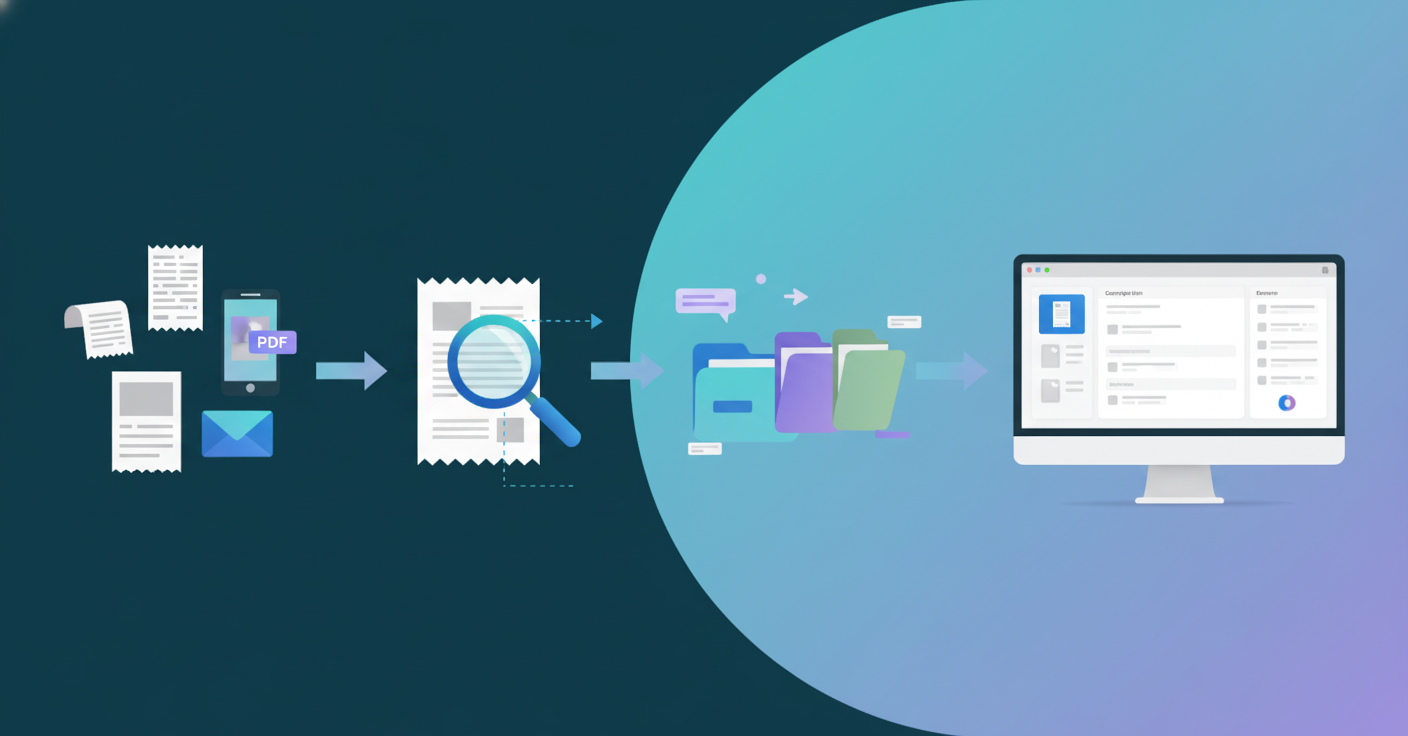

Receipt accounting in practice follows four steps, whether your firm handles five receipts a day or five hundred.
Collecting the receipt from wherever it arrived: email attachment, PDF, phone photo, paper scan, WhatsApp forward. Automated invoice capture handles this intake layer without manual sorting. This step sounds trivial until you're chasing down a client who forgot to send last month's fuel receipts. Volume and format inconsistency make capture the messiest step at most firms.
Pulling structured data from the document: vendor name, date, total amount, line items, tax rates. A receipt for office supplies with eight line items needs all eight extracted separately, each with its own description and amount. The right invoice data extraction software pulls every line automatically.
Assigning account codes based on expense type and the client's chart of accounts. Supplies? Equipment? Entertainment? The right code matters for accurate financials and tax treatment.
Pushing the completed entry into Xero, QuickBooks, or whatever system the client uses, with source documents attached and coding confirmed.
Most firms run all four steps manually. A bookkeeper opens the receipt, reads it, types each field, decides on the account code from memory or a spreadsheet, then posts it line by line. Steps one through three are where most time disappears. AI handles capture, extraction, and coding automatically; posting happens through direct integration. The bookkeeper's job becomes reviewing what the AI extracted, not doing the extraction.
Small errors in receipt accounting don't stay small. They travel downstream through every report that touches that transaction.
The most common mistake is capturing receipts as a single total instead of breaking them down by line item. It feels faster in the moment, but consider a restaurant receipt with three distinct components: food costs, a service charge, and GST. Posted as one lump sum, it looks like a single expense. Coded properly, food costs hit a cost of goods account, the service charge lands under entertainment or staff expenses depending on context, and GST gets treated as a recoverable tax item. Three different account codes, three different tax treatments, one receipt.
When that receipt gets collapsed into a single total, three things go wrong immediately:
"Before using Tofu, it would take me between 3 to 4 hours to input and review a client's invoices. With Tofu, I can now complete the process in just 30 to 60 minutes." - Tammy Tan, Bookkeeper, Klozer (Malaysia)
The compounding happens across months. One misclassified receipt is a rounding error. Fifty misclassified receipts across a quarter creates a P&L that no longer reflects reality, and a tax return that requires a painful correction.
Most receipt workflow problems trace back to a few fixable habits. Following expense receipt best practices prevents errors from compounding across client accounts.
AI reads receipts directly from whatever format they arrive in: scanned PDFs, phone photos, multilingual supplier documents, fading thermal paper. The best invoice capture software handles all formats without preprocessing. No sorting, no preprocessing, no template configuration required.
Vendor name, date, line items, and tax codes are pulled automatically. The AI learns each client's chart of accounts from prior history and applies the right codes going forward. When you correct a coding decision, the system remembers it. That knowledge stays even when staff turn over.
Posting goes straight to Xero or QuickBooks with source documents attached. You review what was extracted, confirm it looks right, and publish. No copy-paste. No separate upload. The entire receipt accounting workflow moves faster without adding anyone to the team.
Three terms that often get conflated in search, each describing a distinct step in the bookkeeping cycle.
| Workflow | What it covers | Direction |
|---|---|---|
| Receipt accounting | Capturing and coding expense documents from vendors | Inbound (money out) |
| Invoice processing | Creating and managing sales invoices sent to clients | Outbound (money in) |
| Bank statement reconciliation | Matching posted entries against actual bank activity | Verification layer |
Receipt accounting sits at the front of the cycle. It's where raw documents become coded journal entries. Invoice processing handles the other side: what your clients bill out. Bank reconciliation is the check at the end, confirming that what was posted actually matches what moved through the account.
All three feed the same general ledger. But confusing them means fixing problems at the wrong stage.
When choosing receipt accounting software for your firm, the gap between tools that handle occasional receipts and those built for high-volume firm work is wide. Here are the features worth checking before you commit.
Tofu handles all four steps of receipt accounting without manual input at any stage.
Receipts arrive however clients send them: email forwarding, Google Drive sync, SharePoint, or direct upload. Tofu reads every line item, works across 200+ languages, and processes handwritten documents where other tools return nothing. It learns each client's chart of accounts from history and applies the right codes without configuration. Corrections stick permanently, so knowledge survives staff turnover.
Posting goes directly to Xero or QuickBooks with source documents attached. No separate upload. No CSV import. Bookkeepers review what Tofu extracted, confirm it, and publish.
Firms processing hundreds of receipts monthly stop adding headcount to handle the volume. The work moves from typing PDFs to catching exceptions, which is where trained accountants should spend their time.
Most firms know their receipt accounting entries take too long but assume that's just part of the job. It's not anymore. Your bookkeepers can review AI-extracted receipts in minutes instead of typing them for hours, which means you handle more clients without stretching your team past capacity. The firms already doing this aren't special, they just stopped accepting manual data entry as unavoidable. Book a demo and bring a messy receipt or two to test it live.
Receipt accounting records expense documents when money goes out (purchases made by your client), while invoice processing handles sales documents when money comes in (invoices your client sends to their customers). Both feed the same general ledger, but they sit on opposite sides of the cash flow.
Recording receipts as a single total instead of breaking them down by line item. A restaurant receipt with food, service charge, and tax needs three separate entries with different account codes and tax treatments. Collapsing it into one total distorts your client's P&L and creates incorrect tax filings.
Manual processing takes roughly 20 minutes per receipt and costs about $58 when you factor in labor. AI handles the same receipt in under a minute by capturing vendor details, extracting every line item, coding to the chart of accounts, and posting with the source document attached.
Yes. AI tools built for accounting firms process receipts in 200+ languages without requiring translation steps. Thai supplier invoices, Chinese fapiao, Arabic documents, and even handwritten receipts get extracted with English translations appearing automatically.
Look for line-item extraction (instead of header capture alone), multilingual support, direct integration with your accounting software instead of CSV export, per-client learning that remembers coding patterns, and flat pricing so costs don't spike when volume increases.