Jay Sen Lon
June 9, 2026


If you're looking at AutoEntry alternatives, whether you're running a practice in the UK, Australia, Singapore, or anywhere else, you're probably dealing with one of two things: either the per-credit pricing is eating into your margin as client volume grows, or you're tired of paying extra just to extract line items from invoices that should process automatically. AutoEntry worked well enough when it launched, but since Sage acquired it in 2022 the product has largely been left alone. No major feature updates, slower support, and a pricing model that penalizes firms for processing more documents. UK firms feel this acutely, and so does any multi-client practice processing high volumes across different languages and document types. The alternatives below charge flat monthly rates, extract every line item without upcharges, and actually ship new features.
TLDR:
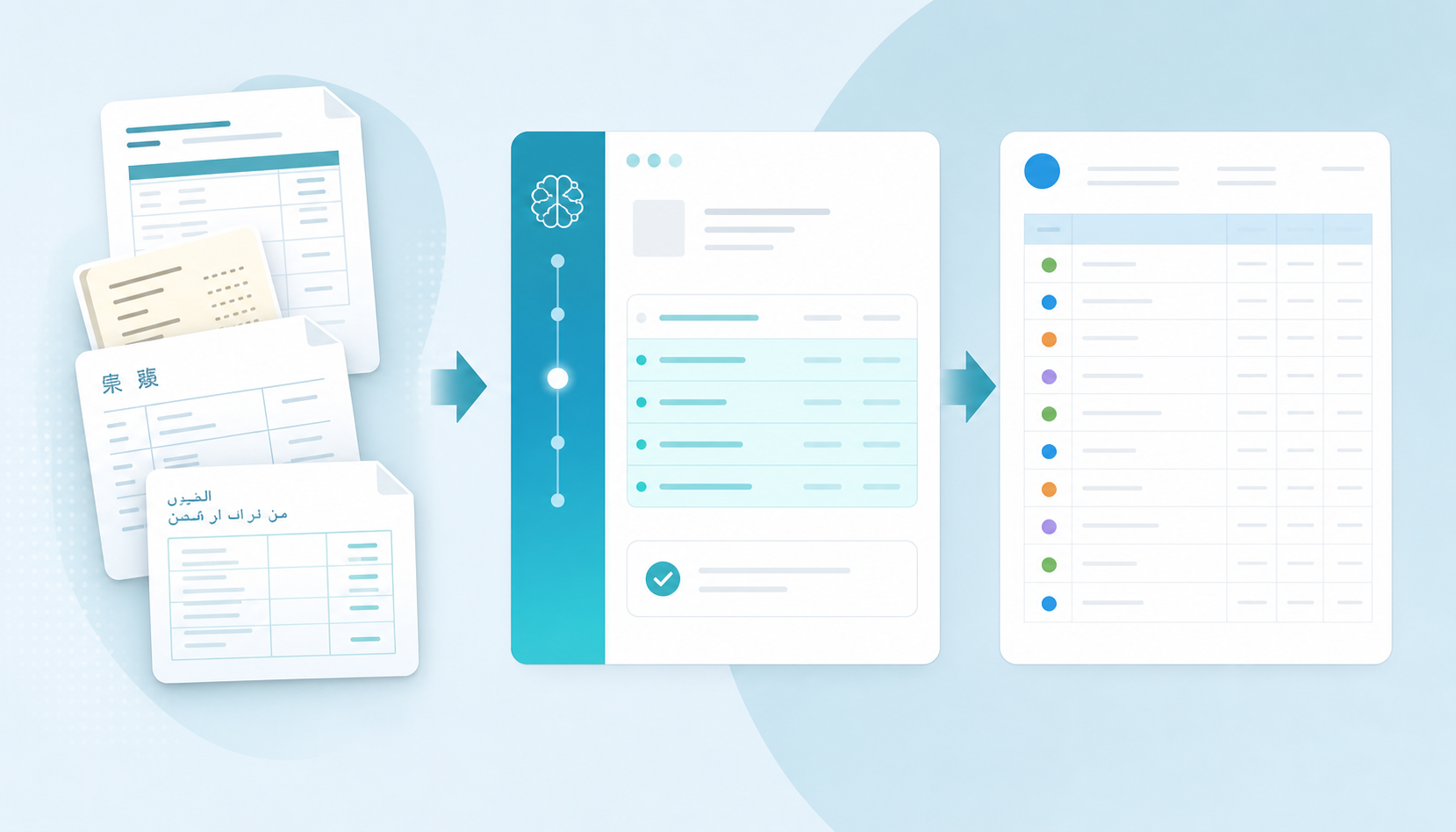
AutoEntry is a cloud-based document capture tool built for accountants and bookkeepers. You photograph or upload a document, and it extracts the key data, then publishes to your accounting software. The core use cases are supplier invoices, receipts, purchase orders, and bank statements.
It connects natively with Xero, QuickBooks, and Sage, which made it a reasonable fit for UK firms when it launched. Sage acquired AutoEntry in 2019, and the product has largely been in maintenance mode since, with limited feature development reported by users.
The tool works through a mix of OCR and rules-based extraction. You can set up supplier rules to apply account codes automatically, and there is a mobile app for receipt capture on the go.
AutoEntry has been a familiar name in UK accounting firms for years, but it has real constraints that push bookkeepers to look elsewhere. The product was acquired by Sage in 2019, and since then development has slowed noticeably. Firms report that the roadmap has stalled, support response times have lengthened, and pricing has crept upward without matching feature improvements.
The core functional gaps matter too. AutoEntry captures header-level data well enough, but full line-item extraction is inconsistent, particularly across non-standard document layouts. Multilingual documents are poorly handled, which creates friction for UK firms serving international clients or processing overseas supplier invoices. Modern document processing automation tools can now process documents 10-50 times faster than manual methods, a benchmark AutoEntry hasn't kept pace with.
For UK firms, there is a compliance dimension worth noting. Under Making Tax Digital for VAT, manually re-typing invoice data from a PDF into Xero constitutes a digital links breach: the data must travel via an unbroken digital chain. AutoEntry satisfies this if it is posting directly via the API, but any manual step in between does not. Tofu extracts and posts via API with no copy-paste step in the workflow, which means it functions as a compliant digital link throughout.
There are a few common reasons firms start looking at alternatives:
If any of those sound familiar, the alternatives below are worth a close look.
The tools below cover the most-searched AutoEntry alternatives for accounting firms right now, whether you're based in the UK or running a multi-currency, multilingual practice anywhere in the world. Each one handles a different slice of the document processing workflow, so the right pick depends on your client volume, document types, and how much manual review you want left on your plate.
Tofu is an AI document processing tool built for accounting firms. Upload invoices, receipts, bank statements, or supplier bills and Tofu extracts every line item, applies your chart of accounts coding, and publishes directly to Xero or QuickBooks Online.
Where AutoEntry charges per credit and caps extraction at header level for many document types, Tofu extracts full line items across 200+ languages with no per-document fees.
Datamolino is a document capture tool focused on invoices and receipts for small accounting firms. It includes line-item extraction on all tiers, which puts it ahead of AutoEntry's default header-only capture, and integrates with Xero, QuickBooks, Sage, and FreeAgent.
The trade-off is coverage: Datamolino processes Latin-script documents only, so firms with suppliers using Arabic, Chinese, Japanese, or other non-Latin scripts will hit a wall. Processing can take up to 24 hours, and pricing is per-document, not flat monthly, so costs scale with volume much like AutoEntry does.
Datamolino is a reasonable fit for lower-volume UK practices with straightforward supplier bases. For firms processing multilingual documents or high monthly volumes, the per-document pricing and language ceiling become limiting quickly.
DocuClipper is a PDF-to-spreadsheet conversion tool, primarily used for bank statements and invoices. G2 ranks it number one for bank statement conversion, but it stops at producing a CSV or Excel file. There is no direct Xero or QuickBooks integration, no chart of accounts mapping, and no learning from your coding history.
In practical terms, DocuClipper handles the extraction step and hands the work back to you. You get a clean spreadsheet; the import, mapping, and posting are still manual. Pricing runs from $39/month (200 pages) to $159/month (2,000 pages) on a per-page basis.
DocuClipper is the right choice if you need a reliable PDF-to-spreadsheet converter and your workflow handles the Xero import separately. If you want extraction, mapping, and direct posting in one step, you'll need a tool that goes further.
Where most AutoEntry alternatives stop at header-level capture, Tofu goes to full line-item extraction across 200+ languages, including handwritten documents. It learns your coding preferences over time, so the longer you use it, the less you review.
AutoEntry's line-item extraction is not included by default. It sits behind an additional credit cost on top of your standard subscription, which means every document you want fully broken down eats into a separate credit balance.
In practice, this matters when you're processing supplier invoices with multiple products, services, or VAT treatments on a single page. Without line-item extraction, AutoEntry captures the header and total, and you're still left manually splitting the rest in your accounting software.
The add-on works across invoices and receipts, and the extracted data can be pushed through to Xero or QuickBooks. However, the credit-based billing model means costs can climb unpredictably as volume grows, particularly for firms processing high document loads at month-end.
If full line-item extraction is a regular part of your workflow, as opposed to an occasional need, the add-on pricing structure is worth factoring into your total cost comparison across alternatives.
AutoEntry is a document capture tool built for accountants and bookkeepers, focused on extracting data from invoices, receipts, and bank statements and pushing it into accounting software like Xero, QuickBooks, and Sage.
It works by having you photograph or upload documents, which are then processed and matched to supplier records. You can set up supplier rules to automate coding, and the data gets published to your accounting software once reviewed.
Here is how the main alternatives stack up across the features that matter most for UK accounting firms.
| Feature | AutoEntry | Tofu | Datamolino | Dext Prepare | Hubdoc |
|---|---|---|---|---|---|
| Line-item extraction | Costs 2 credits vs 1 | Included on all invoices | Included, all tiers | Separate add-on | No |
| Pricing model | Credit-based, credits expire after 90 days | Flat monthly rate | Per-document | Per-client | Free with Xero |
| Processing speed | 2-6 hours typical | Under 10 seconds | Up to 24 hours | Varies | Immediate for supported formats |
| Language support | English only | 200+ languages | Latin scripts only | English and some European | English only |
| Accounting software | Xero, QuickBooks, Sage, FreeAgent | Xero, QuickBooks, CSV for 20+ | Xero, QuickBooks, Sage, FreeAgent | 30+ integrations | Xero only |
| Setup required | Manual supplier rules | Zero (learns from history) | Supplier fingerprinting | Supplier rules per client | Minimal for Xero users |
| Bank statements | 3 credits per page | Included, unlimited | Per-page charge | Additional bundle purchase | Not supported |
A few rows here deserve attention before you move on.
The pricing row shows the sharpest gap at high volume. A firm processing 30 clients with 30 line-item invoices and 20 fifteen-page bank statements each month burns through 2,700 AutoEntry credits, placing them on the Sapphire plan at $480/month. Tofu's Business plan covers the same volume for $199/month. That gap widens further if you're running a larger portfolio.
The line-item extraction row shows a genuine structural split. AutoEntry and Dext Prepare charge extra; Hubdoc skips it entirely. For firms processing invoices with multiple line items, that gap quickly becomes expensive or time-consuming to work around. Dext's pricing has risen noticeably following its acquisition by Iris. A detailed Dext vs AutoEntry pricing comparison shows UK firms with large client portfolios report paying around £430/month, against Tofu's flat ~£160/month equivalent.
The processing speed row matters for month-end closes. Waiting 2-6 hours for AutoEntry to process a batch is friction that compounds across dozens of clients. Tofu processes each document in under 10 seconds, which changes what you can do on a Tuesday afternoon.
The language support row is one most UK-focused comparisons gloss over. If any of your clients deal with suppliers in Asia, the Middle East, or non-Latin-script countries, AutoEntry, Datamolino, and Hubdoc all fall short. Tofu's 200+ language coverage is the only option in this table that handles those documents without manual re-entry.
Tofu is built for accounting firms that need more than header-level data capture. Where AutoEntry extracts supplier names, dates, and totals, Tofu goes further: every line item, every document type, in over 200 languages including handwriting.
The gap shows up in day-to-day work. AutoEntry processes what's on the page and stops. Tofu learns how your firm codes documents, remembers those preferences across every client, and gets more accurate the longer you use it. Setup takes around 15 minutes per client, not hours.
"What used to take me 3-4 hours can be done in 30-60 minutes." - Tammy Tan, Klozer
That kind of result comes from Tofu handling the production work so your team can focus on reviewing, advising, and taking on more clients. If your firm processes a high volume of documents, has multilingual clients, or is tired of paying per-document fees, Tofu is worth a serious look.
The alternatives listed above each handle a specific slice of document processing, and the right one depends on your volume, document types, and how much manual work you're willing to keep doing. If full line-item extraction matters and you're tired of per-document pricing, upload a few of your messiest invoices and watch what Tofu pulls out. You'll know in 15 minutes whether it works for your firm.
Tofu integrates natively with Xero and QuickBooks Online, the two platforms that cover the majority of small-to-mid-sized accounting firms in the UK, Australia, Singapore, and globally. For firms using Sage, FreeAgent, MYOB, or other platforms, Tofu exports a clean, correctly mapped CSV that can be imported directly, so the extraction and coding work still happens automatically; the final import step is manual, not API-pushed. If you're running a mixed-platform practice with some clients on Xero and others on QuickBooks, both are covered without any workflow change. If your firm is entirely on a non-supported platform and a direct API posting is non-negotiable, AutoEntry, Datamolino, and Dext Prepare all offer native Sage and FreeAgent integrations alongside Xero and QuickBooks.
The crossover happens faster than most firms expect. At AutoEntry's current rates, a firm processing 30 clients with 30 line-item invoices and 20 fifteen-page bank statements each month burns through roughly 2,700 credits: that's the Sapphire plan at $480/month. Tofu's Business plan covers the same volume for $199/month. Even at lower volumes, the math tips in favour of flat-rate pricing: a firm processing 500 documents a month with line items on half of them crosses the flat-rate advantage at around 10 to 15 active clients, depending on document complexity. The harder-to-quantify savings are in staff time: every hour spent on manual correction or re-entry at $30 to $50/hour compounds quickly against a fixed monthly fee. If your current tool is costing more per month than one billable hour of staff time, the switch is worth running the numbers on.
If you're processing multilingual documents, hitting credit-based pricing walls at month-end, or waiting hours for bank statement processing, it's time to look at alternatives. Firms also switch when line-item extraction costs add up unpredictably or when support response times lengthen.
Focus on full line-item extraction (beyond header capture), flat pricing models that won't surprise you as volume grows, processing speed for month-end deadlines, and multilingual support if you handle international clients. Check whether bank statements cost extra credits or are included.
AutoEntry charges per document with separate credit costs for line items and bank statements, and credits expire after 90 days. Flat monthly pricing like Tofu's covers unlimited documents within your tier, so a firm processing 2,500 entries pays £199 monthly regardless of document type or complexity.
AutoEntry processes English-only documents and rejects non-Latin scripts like Arabic, Chinese, or Japanese. Tofu extracts handwritten receipts and processes 200+ languages automatically, including right-to-left scripts, with no language selection required before upload.
Header-level extraction captures supplier name, date, and total only, leaving you to manually split multi-line invoices in your accounting software. Line-item extraction pulls every product, quantity, price, and account code automatically, so the invoice posts complete without manual typing.
At 50+ clients, the per-document and per-credit models used by AutoEntry and Dext become expensive quickly. The tools worth considering are Tofu, Datamolino, and Hubdoc: each integrates directly with Xero via API, so every document posts without a manual import step. Tofu is the strongest fit for high-volume multi-client practices: it extracts full line items across invoices, receipts, and bank statements in 200+ languages, learns your chart of accounts coding per supplier, and prices at a flat monthly rate with unlimited users and clients. At that volume, the math is roughly $199/month covering your entire client base, not a per-credit bill that scales with every invoice processed. Datamolino handles line-item extraction well but prices per document and covers Latin scripts only. Hubdoc is free with Xero but skips line-item extraction entirely and doesn't support bank statements, which limits its usefulness at scale.