Saman Herath
February 24, 2026

A 30-line wholesale invoice lands in your inbox. Your OCR tool pulls the supplier name, date, and total. Then your bookkeeper spends the next 20 minutes typing the other 29 lines because the software stopped at the header.
This is the reality of legacy receipt OCR: tools that promise automation but deliver a fancy document preview. They skip line items entirely, charge extra for them, or require hours of supplier rule configuration before they extract anything useful. Handwritten receipt from a wet market? Rejected. Arabic invoice? Not supported. 50-page bank statement? That will be extra.

We tested seven receipt OCR tools on what actually matters to accounting firms: the ability to extract complete invoice data, across any language or document format, without manual setup.
TLDR:
Receipt OCR scanning software reads invoices, receipts, and bank statements, then extracts the data so you don't have to type it manually. OCR (Optical Character Recognition) converts images and PDFs into text. When combined with AI, the software can categorize transactions, match them to your chart of accounts, and publish directly to your accounting software.
For accounting firms, basic OCR isn't enough. You need software that extracts line items, not just totals. A 30-line supplier invoice should pull every description, quantity, unit price, and account code automatically. The software should handle receipts in Chinese, Arabic, Thai, or handwriting without requiring translation.
We ranked these tools based on what accounting firms need to process receipts and invoices. Here's what mattered:
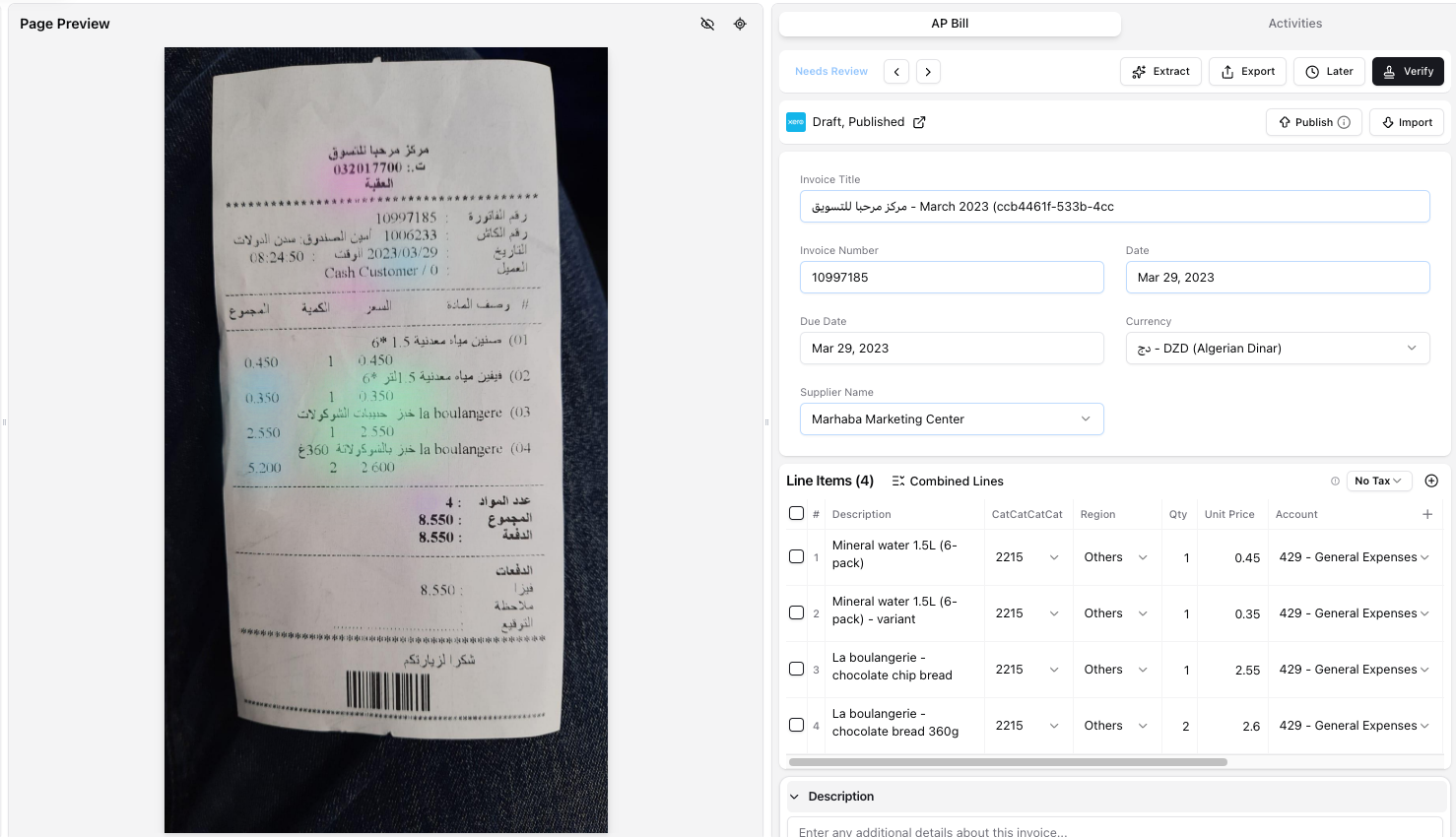
Tofu is AI document processing built for accounting firms that handle receipts, invoices, and bank statements across multiple languages, formats, and document quality levels. Unlike legacy OCR tools that require hours of supplier rule configuration, Tofu connects to your Xero or QuickBooks account, reads your existing chart of accounts and coding patterns, and starts extracting in about 15 minutes.
What Tofu actually does
Upload any invoice and Tofu extracts every line: description, quantity, unit price, account code, and tax treatment. Not just the header total. A 30-line wholesale invoice comes back with all 30 lines coded to your chart of accounts automatically.
The AI learns from corrections. When you fix an account code, Tofu remembers that pattern for every future invoice from that supplier. The knowledge builds over time and stays with your firm even when staff leave. No manual rule builders. No "if supplier = X, then code to Y" logic.
Key features
Tofu works in 15 minutes instead of requiring hours of setup, handles documents other tools reject, and charges a flat monthly fee instead of per-document pricing.
Pricing
Flat monthly plans starting at $79/month (800 documents) and $199/month (2,500 documents). Unlimited users on every plan. No per-document charges. No per-user fees.
Dext is a receipt capture and pre-accounting tool built for UK accounting firms processing English-language documents. It offers line-item extraction as a credit-based add-on and requires manual supplier rules before it delivers value.
What they offer
Good for: UK accounting firms with exclusively English-speaking clients who have budget for per-client pricing and staff time to build supplier rules.
Limitation: Dext charges per client (starting at ~$235/month for 10 clients) and requires manual rule configuration per supplier. Line-item extraction costs double credits, bank statements cost 3 credits per page, and it rejects non-English documents.
Bottom line: Dext has strong brand recognition in UK markets, but its credit-based pricing and manual configuration requirements make it expensive and time-consuming for firms processing non-English documents.
Hubdoc is Xero's free bundled document capture tool that extracts header-level data only. It captures supplier name, date, total, and invoice number but cannot extract line items. Xero has publicly confirmed they have no plans to add line-item extraction to Hubdoc.
Good for Xero users with very basic receipt scanning needs who only require document totals and cannot budget for paid tools.
Limitation: Hubdoc extracts header fields only, not line items. It supports English only, has no handwriting recognition, cannot auto-split PDFs, and has seen minimal development since Xero acquired it in 2018. When a 30-line invoice arrives, Hubdoc captures the total but your team types the other 29 lines manually.
Veryfi is an expense management and receipt OCR tool focused on construction and field teams. It offers mobile receipt capture, line-item extraction, and expense reporting workflows with integrations to Xero and QuickBooks.
Veryfi provides mobile-first receipt capture with fast OCR processing, line-item extraction from receipts and invoices, expense management features including approval workflows, time tracking and job costing for field teams, and SOC2 Type2, HIPAA, and GDPR compliance.
Good for construction companies and businesses with mobile field teams who need combined expense management, time tracking, and receipt capture in one tool.
Limitation: Veryfi is built for internal company use rather than accounting firms managing multiple client entities. It lacks the multi-entity architecture, chart of accounts learning, and bank statement processing depth that firms need.
AutoEntry is a credit-based document capture tool owned by Sage that processes invoices, receipts, and bank statements. It charges 1 credit per invoice, 2 credits for line-item extraction, and 3 credits per bank statement page. AutoEntry rejects non-English documents entirely, including Arabic or Chinese/Japanese fonts.
Their OCR extraction works for invoices and receipts, with line-item extraction available at double the credit cost. Bank statement processing runs 3 credits per page. They connect to Sage, Xero, and QuickBooks.
AutoEntry fits Sage users processing English-only documents at low volumes who want native ecosystem integration. The per-credit pricing scales poorly: a 50-page bank statement costs 150 credits. Credits expire after 90 days, and processing delays of 2 to 6 hours have been reported. The English-only restriction makes it unsuitable for firms with international clients.
Datamolino is a UK and Australian-focused document capture tool that uses a human-in-the-loop verification process. When AI cannot read a document, it routes to a human team, which can take up to 24 hours. It supports Latin-script languages only and uses supplier fingerprinting for automation.
Line-item extraction, bank statement conversion to CSV/Excel, human verification for difficult documents, and native integrations with Xero, QuickBooks, FreeAgent, and Acumatica are included.
Datamolino works well for UK or Australian firms processing clean, Latin-script English invoices who value human backup verification over instant processing speed. But it only supports Latin-script languages. Handwritten or poor-quality documents require the 24-hour wait. No support for Chinese, Arabic, Thai, Japanese, or non-Latin scripts. Per-document pricing starts at $25/month base plus $0.28 per bill and $0.70 per bank statement page.
Human verification delivers high accuracy, but the delay and Latin-script-only support limit usefulness for firms needing instant results or processing multilingual documents.
DOKKA is an Israel-based AP automation tool built for mid-market companies running enterprise ERPs like NetSuite and SAP. It handles approval workflows, PO matching, and financial close management for internal finance teams, not accounting firms processing client documents.
Good for: Mid-market companies with internal finance teams running enterprise ERPs who need AP approval workflows and PO matching.
Limitation: DOKKA is built for single-company AP workflows, not multi-entity accounting firms. Pricing starts at $400/month. Bank statements are not fully supported. Setup takes 7 to 14 days.
Here's a side-by-side breakdown of the tools covered in this guide:
| Feature | Tofu | Dext | Hubdoc | Veryfi | AutoEntry | Datamolino | DOKKA |
|---|---|---|---|---|---|---|---|
| Line Item Extraction | Yes | Extra credits | No | Yes | Double credits | Yes | Yes |
| Multi-Language Support | 200+ languages | English focus | English only | Limited | English only | Latin scripts | 7 languages |
| Handwriting Recognition | Yes | No | No | Limited | No | No | No |
| Bank Statement Processing | Unlimited | Credit-based | CSV only | Limited | 3 credits/page | Per-page charge | Limited |
| Chart of Accounts Learning | Automatic | Manual rules | Manual rules | Limited | Manual rules | Fingerprinting | No |
| Auto-Split PDFs | Yes | Limited | No | No | No | No | No |
| Starting Price | $79/month | ~$235/month | Free with Xero | Team pricing | $13/month | $25/month | $400/month |
| Setup Time | 15 minutes | Hours | Minutes | Hours | Hours | Hours | 7-14 days |
Tofu solves what legacy receipt OCR tools get wrong: setup time and document coverage. Dext requires hours building supplier rules before processing starts. Tofu reads your existing chart of accounts and works in 15 minutes. Hubdoc captures totals only, forcing your team to type line items manually. AutoEntry rejects non-English documents completely.
Tofu extracts every line item from every receipt in any language, including handwriting. The AI learns from your corrections and remembers patterns after staff leave. Bank statements process in minutes, not hours. You pay a flat monthly rate instead of rationing credits.
The best receipt OCR scanning software handles every document format your clients send without making you pay per page or wait for human verification. Tools that only process English or reject handwritten invoices create more work than they save. Tofu extracts every line item, codes transactions automatically based on your existing patterns, and charges a flat monthly rate so you can process unlimited documents without rationing credits.
Start by identifying your document types and languages. If you process multi-line invoices in multiple languages or handwritten receipts, you need line-item extraction and multilingual support. If you only handle simple English receipts, basic tools may work. Consider your pricing tolerance: flat monthly fees work better than per-document credits if you process high volumes or long bank statements.
Tofu processes 200+ languages including Arabic, Chinese, Thai, and handwritten documents without configuration. Dext and AutoEntry focus on English-only processing and reject non-Latin scripts. Datamolino supports Latin-script languages only. If you serve clients across multiple countries or language regions, choose software that handles multilingual documents natively rather than requiring translation steps.
Only some tools extract line items. Tofu includes line-item extraction at no extra cost. Dext charges double credits for line items. Hubdoc captures header totals only and cannot extract line items at all. AutoEntry offers line-item extraction but charges 2 credits per invoice instead of 1. Check whether line-item extraction is included or costs extra before committing to a tool.
Hubdoc is free with Xero but extracts header data only and requires manual line-item entry. Paid tools like Tofu extract every line item, learn your chart of accounts, handle handwriting and multiple languages, and publish directly to accounting software with source documents attached. Free tools save upfront cost but create ongoing manual work that paid tools eliminate.
Setup time varies by tool. Tofu connects to your accounting software and starts working in 15 minutes by learning your existing chart of accounts. Dext and AutoEntry require hours building supplier rules before processing begins. DOKKA takes 7-14 days for implementation. Choose based on whether you need immediate results or can invest time in configuration.