Xero & QBO App Store ratings

Your clients already send receipts on WhatsApp


Every photo they send lands in tofu, extracted, coded, and ready for your accounting system.
Company logoCompany logo
MacBook mockup

Stop Chasing Clients for Paperwork

Your clients won't scan. They won't log in to a portal. They won't email a PDF. They take a photo and send it to you on WhatsApp.

The month-end chase

You send reminders. They send excuses. The books wait.

Receipts buried in chats

The receipt sits between a voice note and a holiday photo. Someone has to scroll back and find it.

Portals nobody opens

You paid for a client portal. Your clients never made a password.

Save, rename, upload, repeat

Every photo becomes a download, a file name, and an upload. Two hundred times a month.

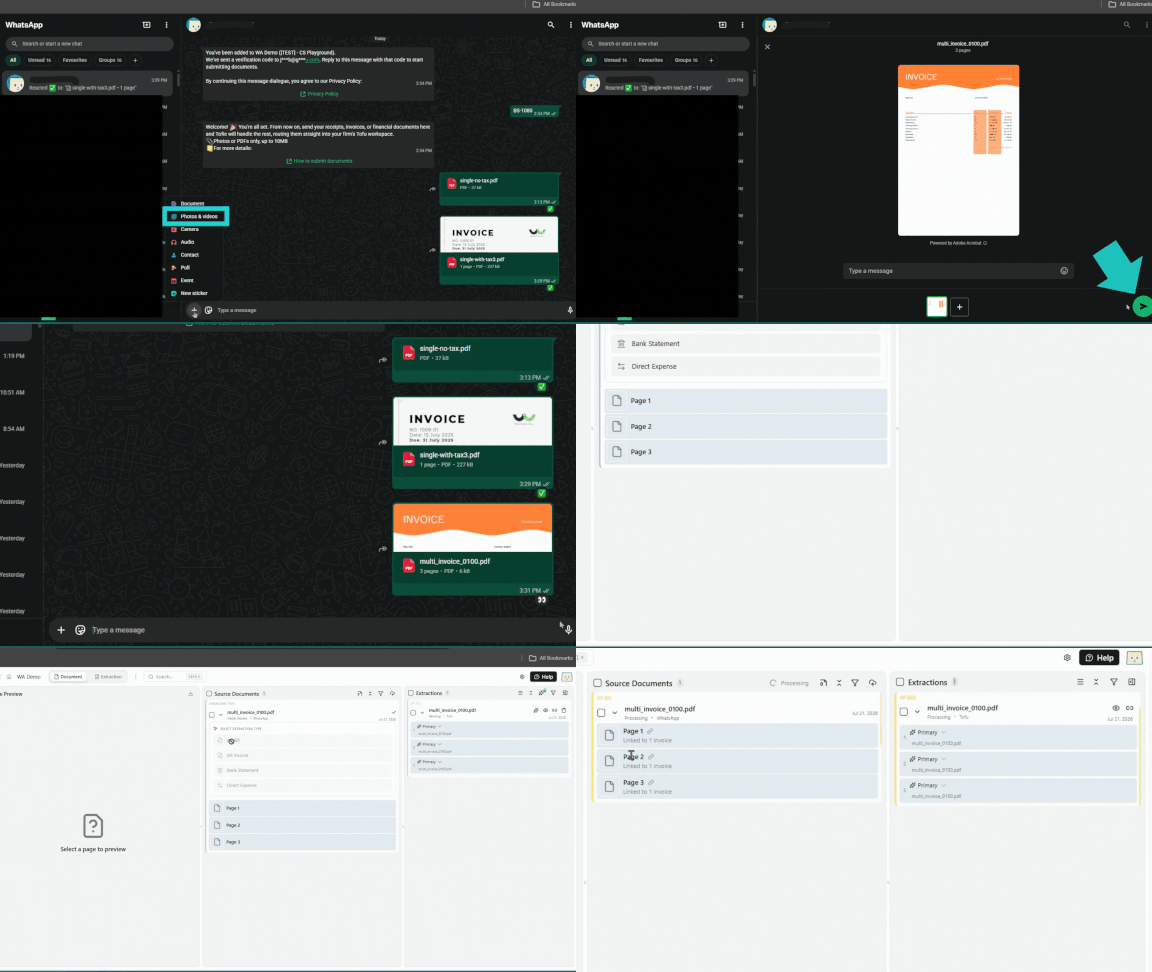
One number. Zero new habits. Give your client Tofu's WhatsApp number.
Why Firms Hand Out the Number

The shoebox problem ends where your clients already live.

Documents arrive all month

Receipts come in the day they happen, not in a shoebox on the 28th. Month-end stops being a landslide.

Nothing for clients to learn

No app. No login. No training. If they can send a photo, they can do this.

Real photos work

Blurry, crumpled, handwritten, or in another language. Tofu reads what clients send, not what you wish they sent.

A record behind every entry

Each transaction keeps its source document attached. When the auditor asks, the answer is one click — and posts cleanly to Xero or QuickBooks.

WhatsApp Integration FAQs

Can’t find the answer you’re looking for? Please contact our team.
What can I send through WhatsApp?

Photos or PDFs of receipts, invoices, bank statements, or other financial documents, up to 10MB per file.

How do I set up WhatsApp submission?

Your firm is added to a WhatsApp number and sent a verification code by email. Reply with that code to activate submissions, then start sending documents straight away.

Do I need to install a separate app?

No. It works entirely through WhatsApp, which your team already has installed. There's no separate app to download or login to remember.

Where do my documents go after I send them?

Documents sent through WhatsApp route directly into your firm's tofu workspace, the same as any other upload, ready for processing and review.

Is there a file size limit?

Yes. Files must be photos or PDFs, up to 10MB each.

How bookkeepers like you use Tofu

Trusted by thousands of bookkeepers and accounting firms across 30+ countries.

"Instead of typing all day, our staff is now thinking about compliance, audits, and how to advise clients properly."

Photo of Iqbal Rahman, Director at Arass Consultants
Iqbal Rahman
Director
,
Arass Consultants

"One of the few apps which totally addresses problems faced by bookkeepers. Very practical for day to day work."

Photo of Ahmad Shahid Aminul Rashid, Business Development Supervisor at Accounting Superhero
Ahmad Shahid Aminul Rashid
Business Development Supervisor
,
Accounting Superhero

We have found tofu to be highly beneficial for our bookkeeping processes, as it significantly enhances both efficiency and overall effectiveness.

Photo of Shairas Ahamed, Manager Accounts & Operations at Kloudac
Shairas Ahamed
Manager Accounts & Operations
,
Kloudac

"We have been using tofu for a few months now, and we are very happy with the support provided by the team. It has significantly helped us improve both the quality and efficiency of our bookkeeping."

Photo of Shinas ASM, Founder & CEO at Kloudac
Shinas ASM
Founder & CEO
,
Kloudac

"I’ve recently implemented tofu for our invoice processing workflow, and it has quickly proven to be one of the most efficient automation tools we’ve added to our Xero stack.

The setup was incredibly fast, and the interface is clean, intuitive, and easy for the team to adopt."

Photo of Ian Pang, Managing Director at Aggregate Consultancy Services
Ian Pang
Managing Director
,
Aggregate Consultancy Services

“Before using tofu, it would take me between 3 to 4 hours to input and review a client’s invoices. With tofu, I can now complete the process in just 30 to 60 minutes, saving me a significant amount of time.”

Photo of Tammy Tan, Bookkeeper at Klozer
Tammy Tan
Bookkeeper
,
Klozer

“tofu made me a fan! An actual AI-first, automated process with hassle-free setup. One of the smartest teams behind the product. Highly recommended.”


Photo of Valerie Wong, CIO at CAP Advisory Group
Valerie Wong
CIO
,
CAP Advisory Group
"The upload-and-split workflow is so intuitive that our accountants processed the first batch of invoices in minutes. tofu's extraction was spot-on—no more side-by-side typing. If this accuracy holds as volumes grow, we'll onboard new clients without adding head-count."
Photo of Tengku Adibah T. Kamarudin, Director at Accounting Superhero
Tengku Adibah T. Kamarudin
Director
,
Accounting Superhero
"The integration is straightforward and works great—my team picked it up almost instantly. Being able to hover every field back to the source means no more side-by-side PDFs. If tofu can keep this accuracy at scale, we can grow our bookkeeping revenue without adding head-count."
Photo of Aloysius Cheah, Operations Manager at YTK
Aloysius Cheah
Operations Manager
,
YTK

Your clients won't change. Good. They don't have to.

Hand out one number this week and watch the shoebox disappear.