Bank Statement Extraction, Rebuilt From the Ground Up



Extraction Was Never the Hard Part

Splitting accounts and currencies by hand

Coding after extraction, not during it

No way to catch an error until reconciliation fails

CSV as the missing link
Upload the PDF. Tofu does the coding, the checking, and the posting.

From Statement to Posted Entry

Multi-account, multi-currency, handled natively

Account code, tax rate, and tags per line, double-entry intact

Multi-level validation, before anything reaches you

Direct to Xero, no CSV
What's New?
Five upgrades that take a statement from PDF to posted entry.
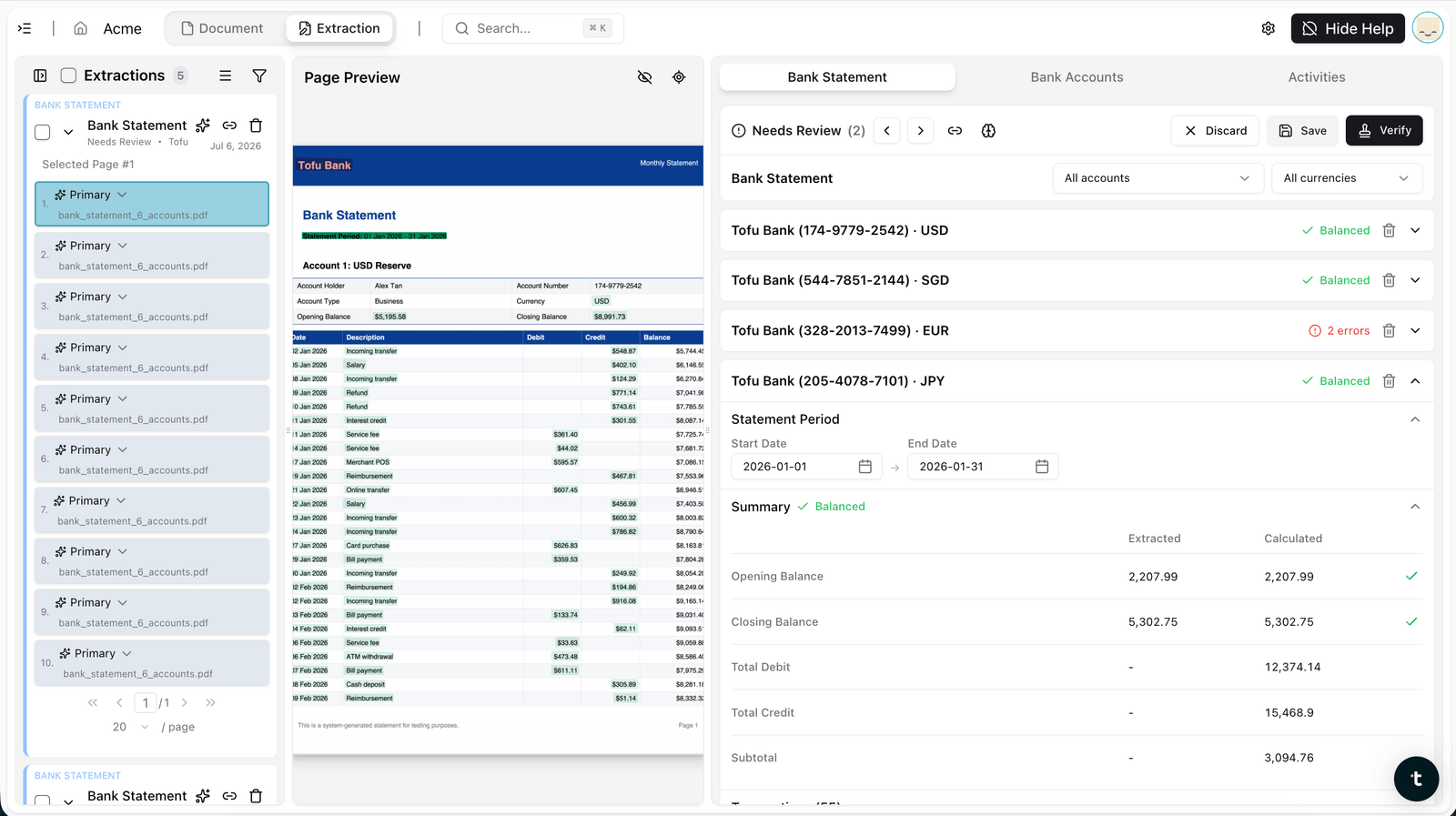
Multi-account, multi-currency in one upload
A single statement with several accounts or currencies gets split, matched, and converted correctly. USD, SGD, EUR, and JPY accounts from one file, each balanced independently.
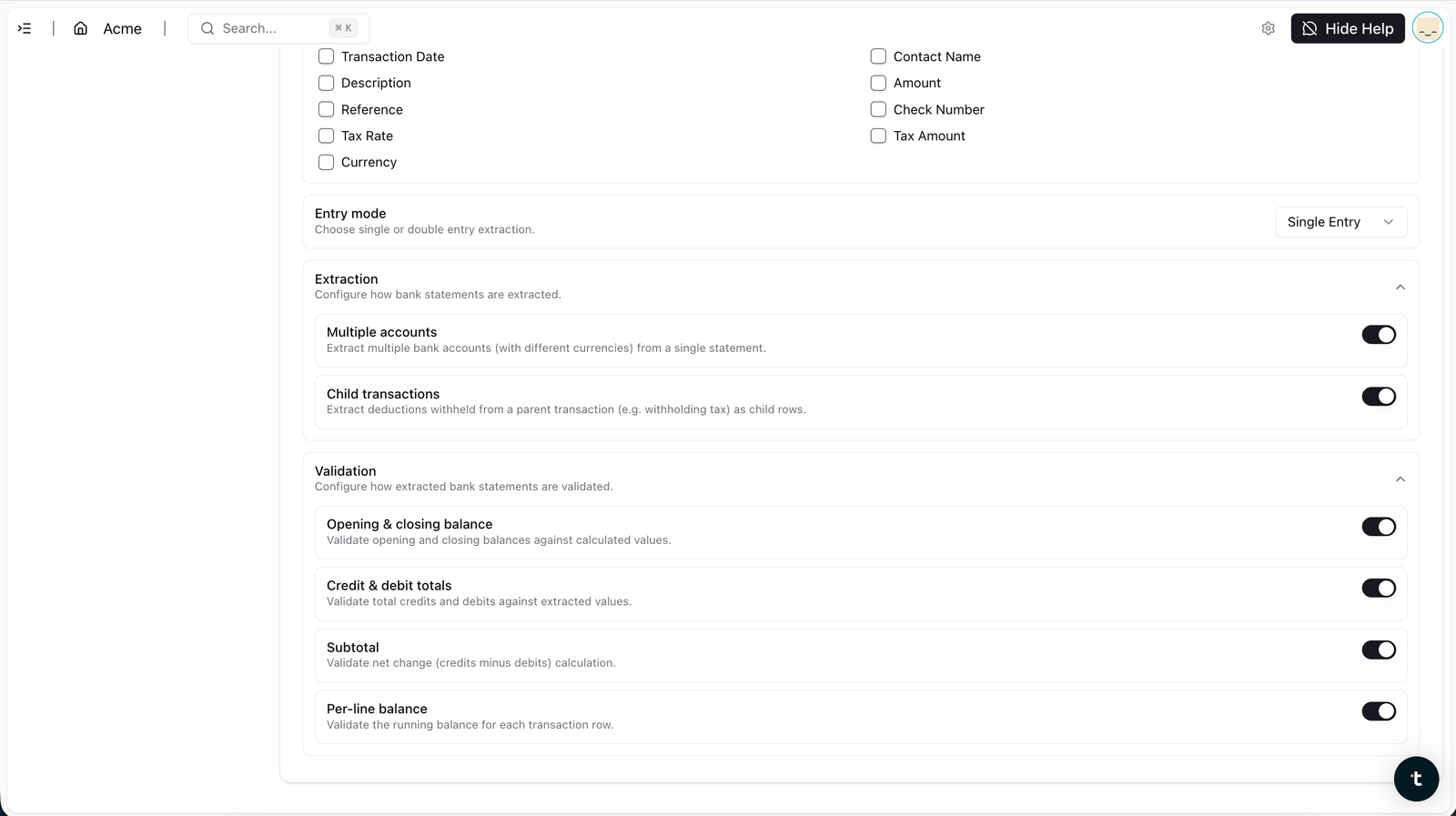
Automatic line-level coding
Account code, tax rate, and tags extracted per transaction. Not just what happened and for how much, but how it should be coded, automatically.
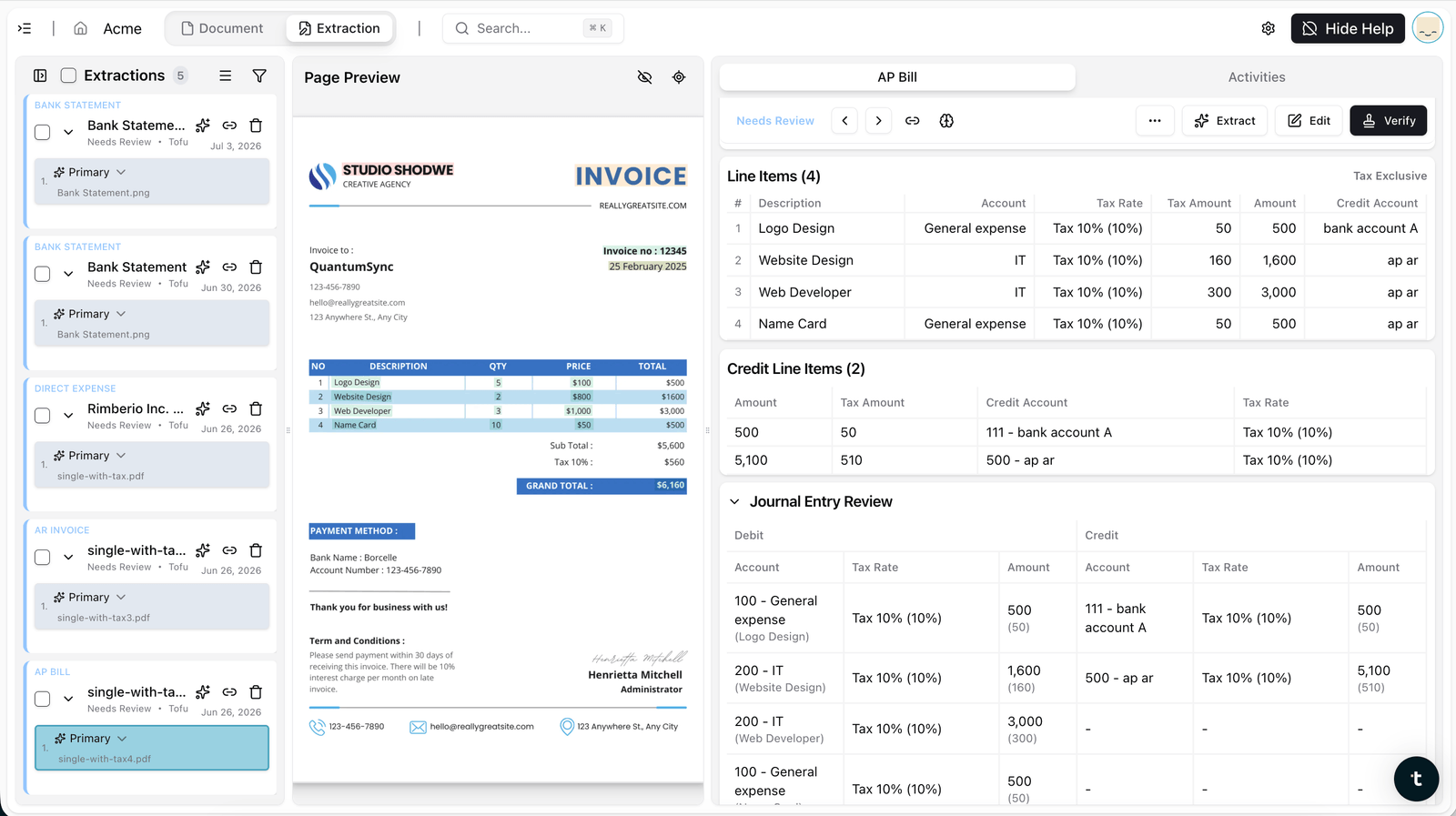
Double-entry support
Parent and child lines keep their relationship intact, with a full journal entry review of debits and credits, instead of collapsing into a single flat row.
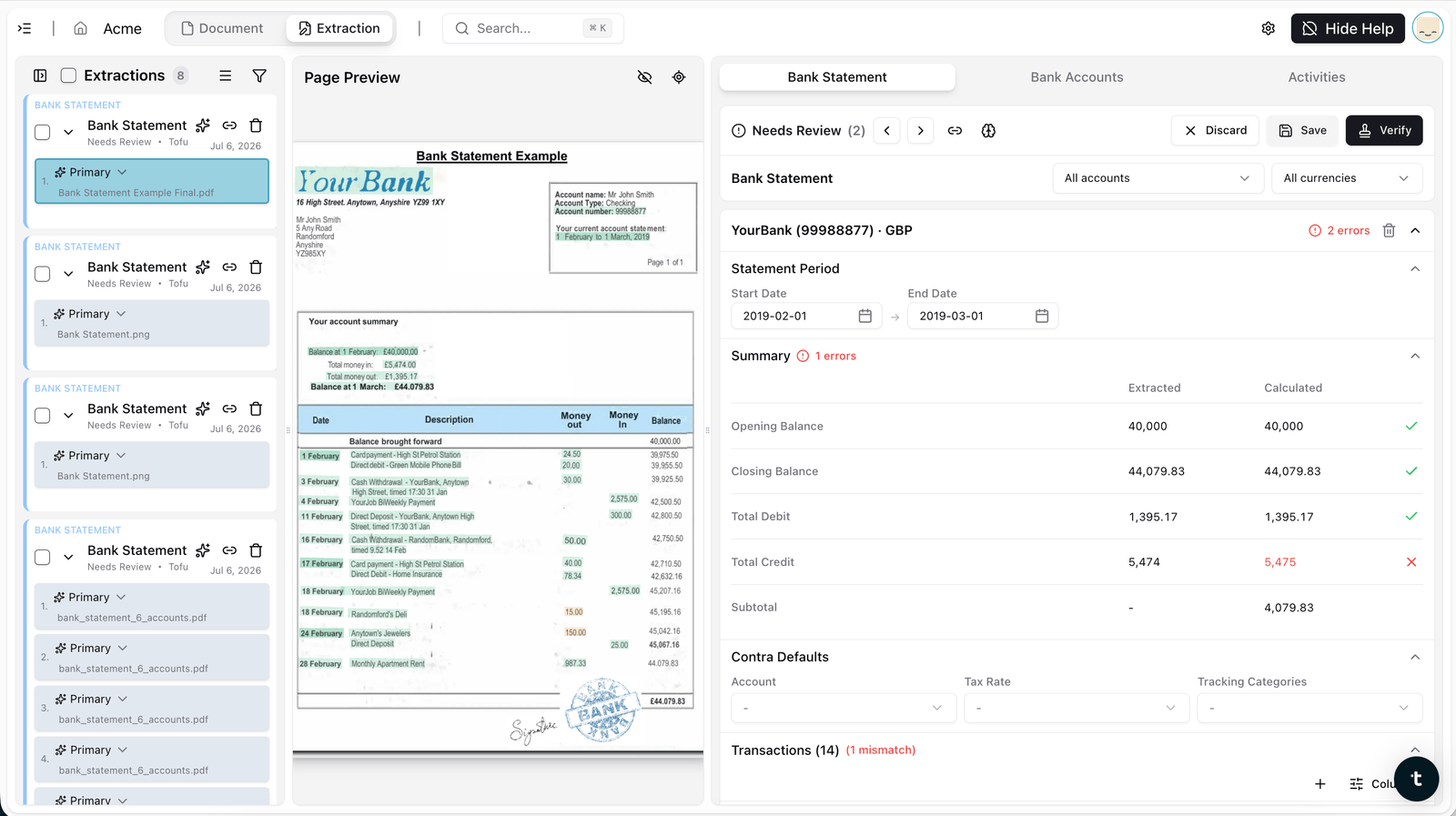
Four-point validation before anything is handed back
Opening and closing balances, transaction dates, credit and debit totals, and per-line running balances, all checked. If something doesn't reconcile, Tofu re-extracts rather than handing you a broken file.
Direct Xero posting
The extracted, coded, validated entry posts straight into Xero. No export, no reformat, no re-import.
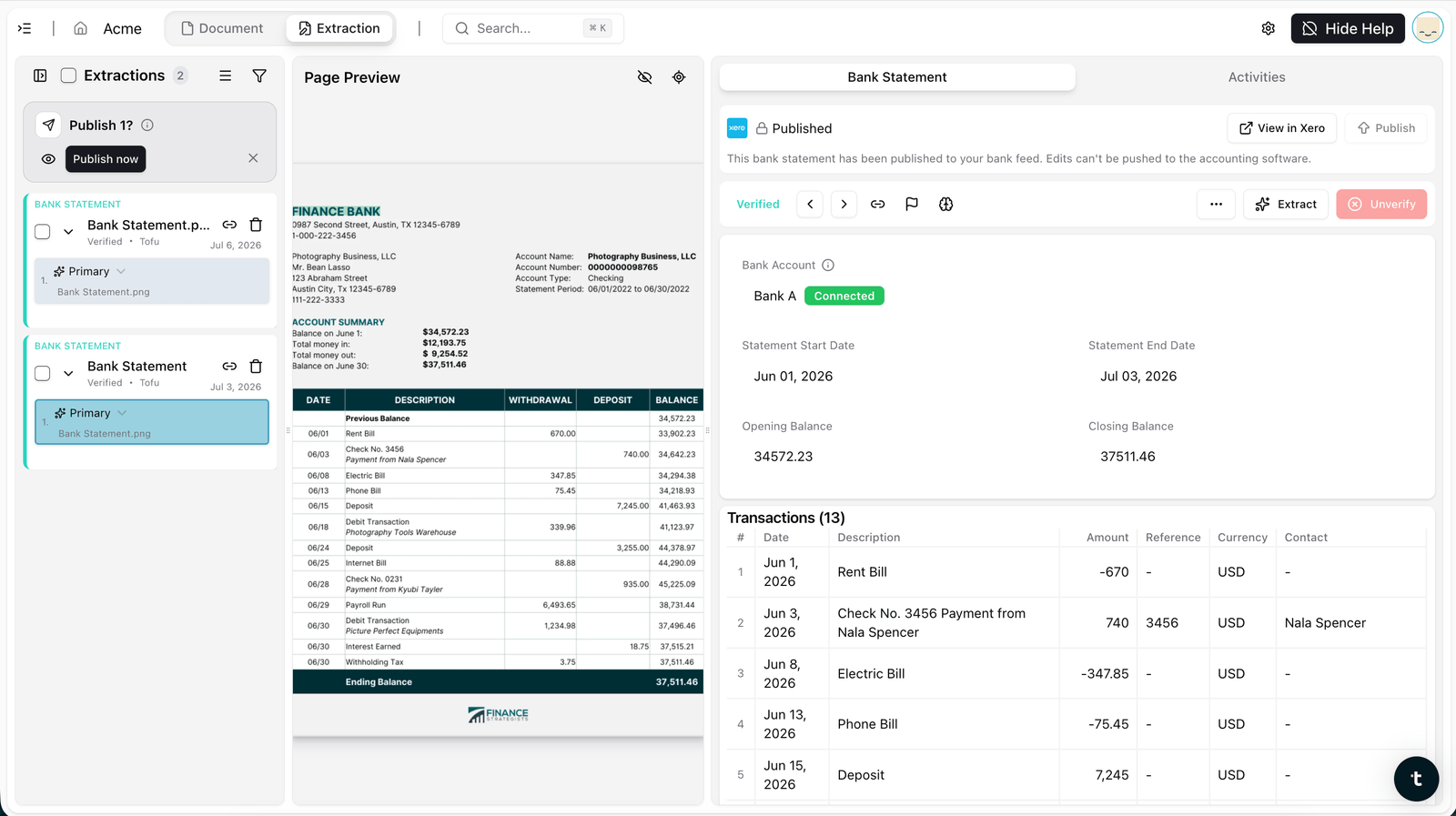
How It Works, in Four Steps
No templates or format settings. Drop any bank statement, including multi-account and multi-currency files, and Tofu extracts, codes, validates, and posts straight to Xero.
Step 1: Upload
Drop any bank statement PDF into Tofu, any bank, any country, any length, including multi-account and multi-currency statements in a single file.
Step 2: Extract and Code
Tofu reads every transaction, date, description, amount, reference, and debit or credit, then assigns account code, tax rate, and tags per line, preserving double-entry and child-transaction structure.
Step 3: Validate
Opening and closing balances, transaction dates, credit and debit totals, and per-line running balances are checked automatically. Click any field to see exactly where it came from on the original statement.
Step 4: Post
One click sends the validated entry straight into Xero. No CSV, no manual import.
What makes Tofu different
| Capability | Tofu | Vendor A | Vendor B | Vendor C |
|---|---|---|---|---|
| Extract rows to CSV | Yes | Yes | Yes | Yes |
| Per-entity coding to client's own COA, tax, tags (double-entry / child transactions) | Yes, self-learning from the GL | Partial, receipts and invoices only | Partial, learns nominal and VAT codes | Rule based only |
| Multi-account plus multi-currency in one statement | Yes (revamp) | No, rejects multi-account | No | Splits multi-account, not multi-currency native |
| Validation and AI agentic self-correction loop | Yes, re-extracts until math ties | No | Balance check only | Balance check only |
| Multilingual plus handwriting (200+ languages) | Yes | No, English centric | No, English centric | No, English and Latin |
| Pricing | Flat rate, unlimited users and entities | Per client, costly at scale | Credit based, statements cost more | Tiered |
Bank Statement Extraction FAQs
It now handles multi-account and multi-currency statements natively, extracts account code, tax rate, and tags per transaction, supports double-entry with child transactions, and posts directly to Xero without a CSV step.
Yes. A single upload can contain several accounts and currencies, correctly split and converted.
It codes each line, account code, tax rate, and tags, so the output is postable, not just readable.
Tofu checks opening and closing balances, transaction dates, credit and debit totals, and per-line running balances before anything is handed back. If it doesn't reconcile, it re-extracts.
No. Validated entries post directly to Xero.
Yes, tested past 1,000 pages in a single upload, with no page limits.
Plans start at $79/month and include a monthly extraction allowance. Bank statement pages each count as one extraction. Xero integration is free, with unlimited users on every plan.
Yes. Parent and child lines keep their relationship intact, with a full journal entry review of debits and credits, instead of collapsing into a single flat row.
No. Upload any bank statement from any bank or country. Tofu adapts automatically — no templates, format settings, or configuration required.
How bookkeepers like you use Tofu