Jay Sen Lon
January 29, 2026

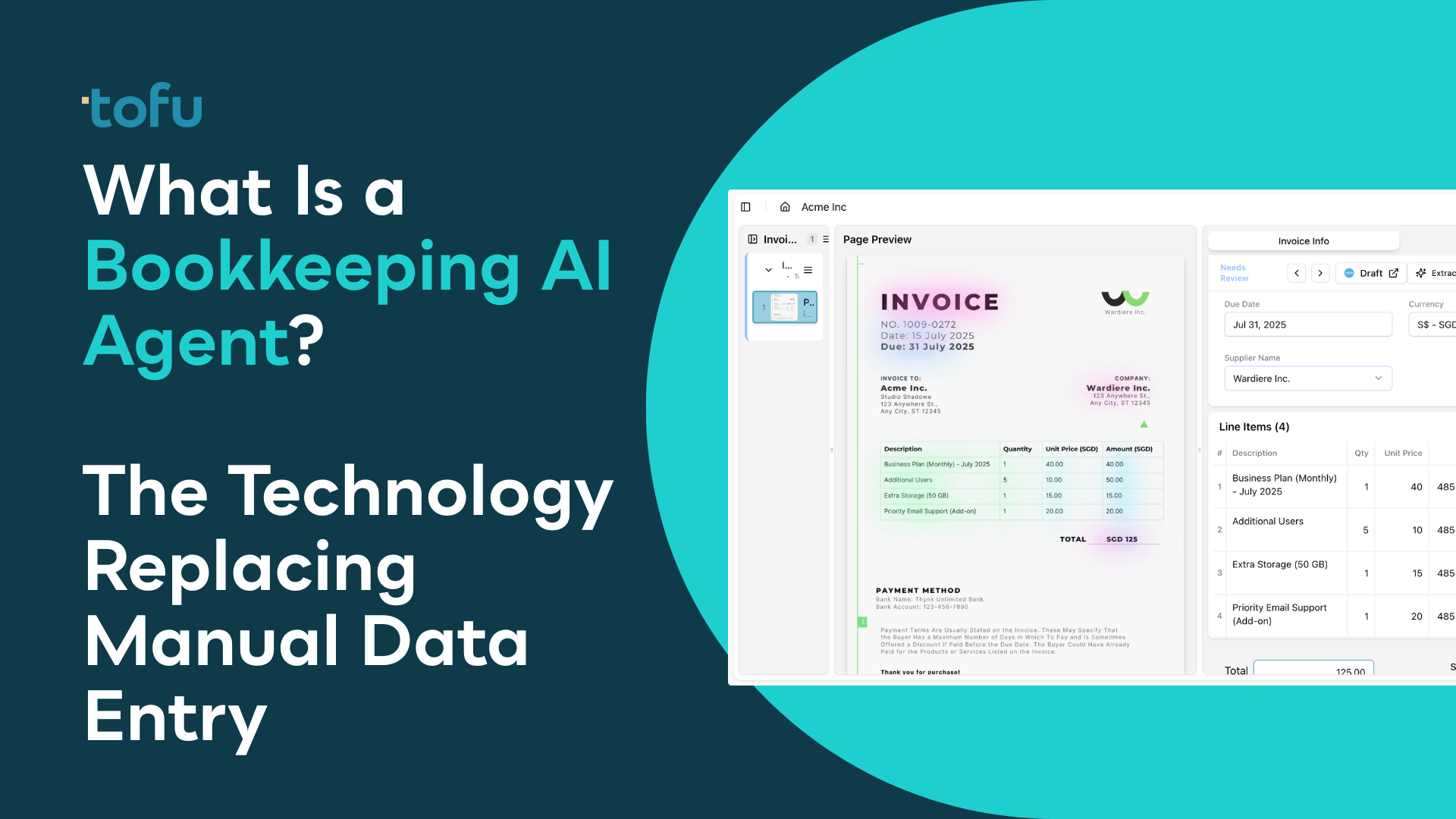
Key Definition: A bookkeeping AI agent is autonomous software that reads financial documents, extracts data, codes transactions to your chart of accounts, and posts directly to accounting software—completing the full data entry workflow without human typing.
Unlike basic OCR (Optical Character Recognition) tools that capture only invoice totals and headers, a bookkeeping AI agent handles everything: document splitting, line item extraction, account coding, and direct publishing to Xero or QuickBooks. The technology emerged in 2024-2025 as a distinct category from legacy OCR tools like Dext and HubDoc.
The term "agent" distinguishes this technology from rule-based automation. Traditional OCR requires users to build extraction rules manually ("If supplier equals X, code to account Y"). A bookkeeping AI agent learns from historical transactions and makes coding decisions automatically. When corrected, it remembers. Knowledge compounds over time rather than walking out the door when staff leave.
Key Statistic: According to accounting firms surveyed in 2026, bookkeeping AI agents reduce document processing time by 70 to 85 percent compared to manual data entry. Tammy Tan, Account Associate at Klozer Malaysia, reports: "Before using tofu, it would take me between 3 to 4 hours to input and review a client's invoices. With tofu, I can now complete the process in just 30 to 60 minutes."
A bookkeeping AI agent processes documents through five stages: intake, splitting, extraction, coding, and publishing. Here is how each stage works:
Clients send documents in disorganized formats: 50-page PDFs containing invoices, receipts, and statements mixed together. A bookkeeping AI agent detects document boundaries using machine learning and splits files automatically. This eliminates manual preprocessing in tools like Adobe Acrobat or iLovePDF.
Tengku Adibah, Director at Accounting Superhero Malaysia, describes the impact: "The upload and split workflow is so intuitive that our accountants processed the first batch of invoices in minutes. tofu's extraction was spot on—no more side-by-side typing."
Key Difference: Line item extraction is the primary differentiator between AI agents and legacy OCR tools. Traditional OCR captures header information only: supplier name, invoice date, total amount. For a 30-line wholesale invoice, users still type every line manually.
A bookkeeping AI agent extracts every line item: description, quantity, unit price, tax treatment, and suggested account code. Complex invoices with 50+ lines, grouped subtotals, and mixed tax rates process in seconds rather than hours.
The AI reads historical transactions from connected accounting software (Xero, QuickBooks, MYOB, Sage). It learns coding patterns: which suppliers map to which accounts, how different tax scenarios are handled, and user preferences for specific transaction types.
Michelle Seet, Assistant Director at GPS Malaysia (a division of Cheng & Co serving 500+ clients across 10 branches), explains how the AI learns: "If let's say maybe the first time they are doing wrong, so maybe the second time we just correct it back and then the third time they can make it correct already. The AI can actually learn what we actually do."
Key Capability: Modern bookkeeping AI agents process 200+ languages including Chinese (Simplified and Traditional), Arabic, Japanese, Thai, Korean, Indonesian, Malay, Vietnamese, Hindi, and European languages. The system also reads handwritten documents and provides English translations alongside original text.
Excellence Singapore serves 500+ clients across Europe, US, China, Australia, and Southeast Asia with a 12-person team. Documents arrive in Mandarin, Hungarian, and languages the team cannot read. Their CEO, Lucas Seah, reports: "Because it's automated, we don't have to look around, what does this mean? Everything is just taken care of automatically."
Extracted data flows directly into accounting software with the original PDF attached to each transaction. No separate upload step. No copy-paste. Audit-ready from day one with full source document traceability.
Key Distinction: ChatGPT and Gemini are conversational AI tools that provide answers. Bookkeeping AI agents complete the actual data entry work and post directly to accounting software.
When you upload an invoice to ChatGPT, you receive extracted information to copy manually. You still type that output into your accounting software. You still attach the source document separately. You still code the transaction to the correct account. You still process multi-page documents one at a time.
A bookkeeping AI agent eliminates these manual steps entirely. It posts every line item directly to Xero or QuickBooks with attachments, proper account coding, and full audit trails.
| Capability | ChatGPT / Gemini | Bookkeeping AI Agent |
|---|---|---|
| Output type | Text response to copy manually | Direct posting to accounting software |
| Document attachments | Manual upload required | Automatic attachment to transactions |
| Account coding | User must code manually | AI learns and applies codes automatically |
| Multi-page processing | One page at a time | Bulk processing with auto-splitting |
| Audit trail | None | Full trail with source verification |
| Learning from corrections | No memory between sessions | Persistent learning per client |
| Accounting software integration | None | Native Xero, QuickBooks, MYOB integration |
Upload a 200-line bank statement to ChatGPT. You receive a summary or extracted data as text. Now type those 200 lines into QuickBooks manually—a task that takes 30-60 minutes.
Upload the same statement to a bookkeeping AI agent. Every transaction extracts automatically with date, description, amount, and debit/credit classification. One click exports directly to your accounting software format.
Measured Result: Iqbal Rahman, Director at Arass Consultants Malaysia, quantified the difference: "Before this, if a client were to have 10 pages of bank statements with 20 or 30 lines in each of them... what I would say would take about 30 minutes at best. It would simply take about two minutes by using tofu." That represents a 93% reduction in processing time.
Key Distinction: Legacy OCR tools like Dext (formerly Receipt Bank) and HubDoc require manual rule configuration and extract invoice totals only. Bookkeeping AI agents learn automatically from your transaction history and extract every line item.
| Feature | Dext / HubDoc | Bookkeeping AI Agent |
|---|---|---|
| Setup time | Hours of rule configuration per client | 15 minutes (connects and learns automatically) |
| Line item extraction | Totals only (line items cost extra or unavailable) | Every line item included by default |
| Language support | Primarily English and Latin alphabets | 200+ languages including Chinese, Arabic, Thai |
| Handwriting recognition | Limited or none | Full handwriting extraction capability |
| Knowledge retention | Rules must be rebuilt when staff leave | AI memory persists indefinitely |
| Pricing model | Per-user or per-document fees | Flat monthly rate, unlimited users |
| PDF splitting | Manual pre-processing required | Automatic document boundary detection |
GPS Malaysia (Cheng & Co) tried multiple OCR tools before finding a solution that worked. Michelle Seet, Assistant Director, describes their experience with Blue Sheet: "There's a lot of functions that we need to set up before we using Blue Sheet. So nobody like to use. It's very complicated really." The 48-person team reverted to manual entry because the tool created more work than it saved.
Accounting Superhero in Malaysia pushed Dext for line item extraction for two years. Tengku Adibah, Director, explains: "Our clients have been asking for line item extraction and we haven't been able to provide them. We were trying to push Dext for it for I believe about two years but nothing came out." They switched when they found a bookkeeping AI agent that delivered line-by-line processing.
When OCR tools produce unreliable output, accounting teams abandon them entirely. GPS Malaysia's experience: "The accuracy is not there and very different. It's very difficult for us to keep on relying on the software. That's why some of the team members prefer using the manual way instead of just using other OCR systems."
Accounting firms using bookkeeping AI agents report consistent patterns in time savings and workflow transformation. Based on case studies from firms in Malaysia, Singapore, and the UK:
| Task | Manual Processing Time | With AI Agent | Time Reduction |
|---|---|---|---|
| Invoice processing (per client monthly) | 3 to 4 hours | 30 to 60 minutes | 75-85% |
| Bank statement (10 pages, 200-300 lines) | 30 minutes | 2 minutes | 93% |
| Monthly close (per client) | 1 week | Few hours to 2 days | 70-80% |
| High-volume processing (300+ transactions) | 4-5 days | 5 hours | 87% |
On workflow transformation: Iqbal Rahman, Director at Arass Consultants Malaysia: "Instead of typing all day, our staff is now thinking about compliance, audits, and how to advise clients properly."
On team adoption: Lucas Seah, CEO at Excellence Singapore (500+ clients, 12 staff): "When there's a bookkeeping task, we ask ourselves: Can you tofu it? If you can, please just load it in. Don't think."
On capacity expansion: The Excellence Singapore CEO describes the impact: "We only have two hands, two arms. It's as if you have four arms now."
On work-life balance: Tammy Tan, Account Associate at Klozer Malaysia: "One case that normally takes four hours, I finished in one hour. It was the first time in a long time I didn't have to work a weekend."
Key Guidance: Bookkeeping AI agents deliver highest ROI for accounting firms processing 200+ client entities with document volumes exceeding 2,000 invoices monthly. Smaller firms with under 50 clients may find the ROI less compelling.
At 3 minutes per invoice for manual entry, processing 1,000 invoices consumes 50 hours of staff time monthly. A bookkeeping AI agent reduces this to review time only—typically 10 to 15 hours. The math favors automation once monthly volume exceeds 500 invoices.
Firms serving international clients, immigrant business owners, or markets with mixed-language documentation benefit from automatic translation and extraction. Wincent Low, Director at Klozer Malaysia: "tofu's multilingual AI and simple UI could half our bookkeeping workload—we're excited for it."
Bank statements are the most transaction-dense documents in bookkeeping. One statement can contain 200+ lines. According to Arass Consultants Malaysia, processing time dropped from 30 minutes to 2 minutes per 10-page statement—a 93% reduction.
If Dext or HubDoc creates more work than it saves, a bookkeeping AI agent addresses the core frustrations: line item extraction, language support, accuracy on messy documents, and zero-configuration setup.
Shairas Ahamed, Manager at Kloudac: "We have found tofu to be highly beneficial for our bookkeeping processes, as it significantly enhances both efficiency and overall effectiveness."
The fastest evaluation method: upload your worst documents. The handwritten receipt your current tool rejects. The 50-page bulk PDF from a disorganized client. The Chinese invoice you currently process manually.
If the AI handles those edge-case documents correctly, it will handle standard documents reliably.
Evaluation Steps:
tofu offers a free trial with no credit card required. Connect your accounting software, upload client documents, and see extracted data land in Xero or QuickBooks within minutes.
Valerie Wong, CIO, describes the evaluation experience: "tofu made me a fan! An actual AI-first, automated process with hassle-free setup. One of the smartest teams behind the product. Highly recommended."
OCR (Optical Character Recognition) reads text from document images and outputs that text for manual copying. A bookkeeping AI agent goes further: it extracts structured data, learns your account coding patterns, and posts transactions directly to accounting software like Xero or QuickBooks. OCR gives you text to copy. An AI agent completes the full data entry workflow automatically.
Yes. Modern bookkeeping AI agents (as of 2026) use machine learning models specifically trained on handwritten text. They process handwritten receipts, invoices, and notes in multiple languages including Chinese characters, Arabic script, and Latin handwriting. Accuracy varies by document quality but typically exceeds 90% for legible handwriting.
Setup typically takes 15 minutes. The process involves: (1) creating an account, (2) connecting your accounting software via OAuth (Xero, QuickBooks, or similar), and (3) uploading your first documents. The AI reads your historical transactions automatically to learn your coding patterns. No manual rule building required.
Leading bookkeeping AI agents support 200+ languages as of 2026, including: English, Chinese (Simplified and Traditional), Arabic, Japanese, Thai, Korean, Indonesian, Malay, Vietnamese, Hindi, Spanish, French, German, Portuguese, and other European languages. Documents containing multiple languages process automatically with English translations provided alongside original text.
Accuracy depends on document quality and the specific AI system. According to firms using tofu, accuracy reaches 95%+ after the AI learns their specific coding patterns over 2-4 weeks of use. The system improves with every correction, building knowledge specific to each client's vendors and account preferences.
AI agents handle data entry, extraction, and initial coding—the repetitive manual work. Human bookkeepers shift to higher-value tasks: review, verification, exception handling, and advisory work. Iqbal Rahman at Arass Consultants describes this shift: "Instead of typing all day, our staff is now thinking about compliance, audits, and how to advise clients properly." The technology augments bookkeepers rather than replacing them.
Most bookkeeping AI agents integrate natively with Xero and QuickBooks Online. Additional integrations typically include MYOB, Sage, Zoho Books, and CSV export for any other accounting system. Check specific provider documentation for the most current integration list.