Jay Sen Lon
February 23, 2026

Most accounting teams know the feeling: a stack of invoices waiting to be processed, each one requiring the same repetitive task - read the document, type the numbers, check for errors, move to the next one. Research from DocuClipper puts the average cost of processing an invoice manually at $15, with an average processing time of 14.6 days from receipt to payment.
That 14.6-day figure is not just about inefficiency - it is about missed early payment discounts, strained supplier relationships, and finance teams spending their capacity on data entry instead of analysis.
The good news: automating invoice data entry is no longer a complex technical project. AI-powered tools have made it accessible for businesses of all sizes, and modern solutions require no coding, no templates, and minimal setup. According to research cited by FinOptimal, companies with invoice automation cut AP processing costs by 50% and reduce processing time by 75%.
Quick Summary: Automating invoice data entry involves replacing manual typing with AI-powered extraction that reads invoices and pushes data directly into your accounting system or Excel. Tofu provides modern AI-powered invoice data extraction for accounting firms and businesses, supporting 200+ languages with zero configuration.
Invoice data entry automation replaces manual typing of invoice information into accounting systems, spreadsheets, or databases with software that reads the invoice and extracts the data automatically.
At its simplest, it involves:
Modern invoice automation extracts structured data from both the header and line-item level:
Header fields:
Line-item fields:
Full line-item extraction matters for accurate inventory tracking, correct tax calculation (where VAT/GST rates vary by item type), and purchase order matching.
Invoice processing has evolved through three stages:
Stage 1 - Manual entry: Someone reads the invoice and types every field into the system. Error rates are high, processing time is long, and volume is limited by headcount.
Stage 2 - Rule-based OCR: Templates and rules extract data from known invoice formats. Works well for recurring suppliers but breaks when formats change and requires setup for every new supplier.
Stage 3 - AI-powered extraction: AI understands document context rather than matching patterns. No templates or rules required. Handles new suppliers, changed formats, and multi-language documents automatically.
Most businesses in 2026 have moved beyond Stage 1 but many are still at Stage 2, dealing with the ongoing maintenance burden of rules-based systems. AI-powered extraction at Stage 3 is now accessible for businesses of all sizes.
The case against manual invoice data entry is not just about efficiency - it is about the compounding costs of errors, delays, and staff capacity.
The average $15 per invoice figure understates the true cost. Staff time at loaded cost, error correction (duplicate entries, transposed numbers), late payment penalties from 14+ day processing cycles, and reconciliation overhead all compound the direct data entry cost.
According to LLCBuddy's 2025 research, 56% of respondents spend more than 10 hours per week processing invoices and administering supplier payments - hours unavailable for higher-value work.
For low-volume businesses (under 50 invoices per month), manual processing is manageable. The tipping point where automation becomes clearly necessary is around 100-150 invoices per month - at which point dedicated staff time, error costs, and processing delays make the case for automation financially obvious.
Businesses processing 200+ invoices monthly are leaving significant money on the table without automation.
For businesses receiving invoices in Chinese, Arabic, or other non-Latin scripts, manual data entry requires either bilingual staff or translation before entry - adding cost and delay. AI-powered tools like Tofu process 200+ languages natively, eliminating this bottleneck.
A complete invoice data entry automation system has four components working together:
How invoices enter the system:
The core of automation - the software that reads the document and pulls out structured data. Key capabilities:
After extraction, data needs validation:
Where the data goes after extraction:
Understanding the architectural difference between traditional and modern approaches helps in selecting the right tool.
Traditional OCR-plus-rules systems work by defining where specific data should appear on a document:
"For invoices from Supplier X, the invoice number is always in the top-right corner, the date is below it, and the total is at the bottom of the right column."
This approach works reliably for high-volume supplier relationships with consistent invoice layouts. It fails when:
Many accounting teams using rule-based tools spend significant time maintaining rules, troubleshooting extraction failures, and manually processing the documents that fall outside configured rules.
AI-based extraction understands document context rather than matching positions. The model has learned from millions of invoices what fields look like across formats, layouts, and languages:
This contextual understanding means:
Tofu is an AI-powered document processing platform that integrates with Xero and QuickBooks Online to automate invoice data entry without configuration, rules, or templates.
Where most invoice automation tools require setup before they can process a supplier's documents, Tofu works from the first document uploaded, regardless of:
This zero-configuration approach is the defining characteristic that separates Tofu from Dext, AutoEntry, and other rule-based competitors. For accounting firms onboarding new clients with diverse supplier bases, zero-configuration means productive from day one rather than weeks of rule setup.
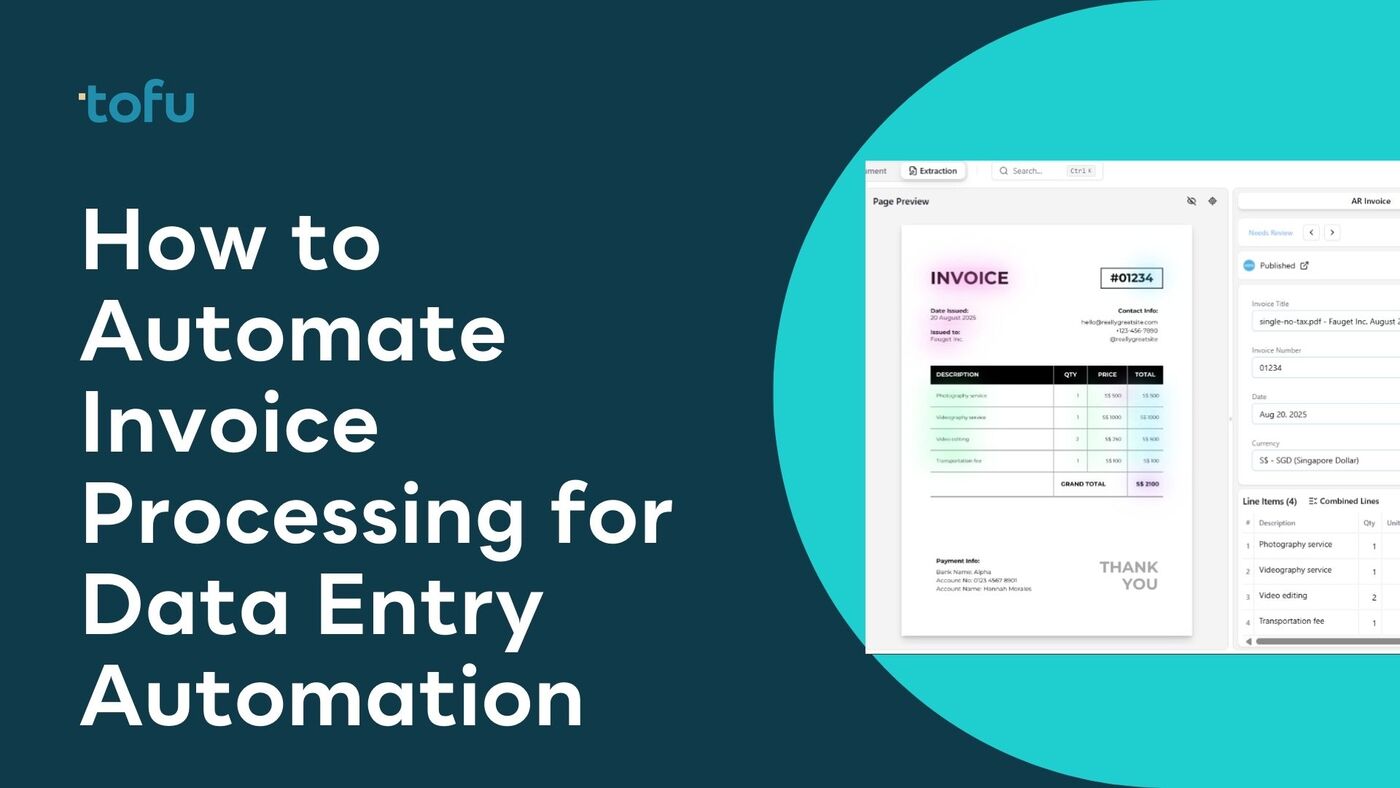
For each invoice, Tofu extracts:
This is full line-item extraction - not the totals-only approach of many competitors. For businesses tracking inventory, calculating VAT by line item, or matching invoices to purchase orders, full line-item data is essential.
Tofu's 200+ language support is particularly valuable for:
This multi-language capability combined with zero-configuration makes Tofu the primary solution for APAC and internationally-focused accounting firms.
Real invoices are often not clean PDFs:
Pricing is fixed monthly with no per-document charges - your cost is predictable regardless of volume fluctuations. This entity-based model means adding staff to your accounting team does not increase software costs.
Customer Reviews:
Xero App Store: 5/5 stars - View Reviews
Tofu was named a Xero Global Emerging App of the Year Finalist 2025 and serves 7 of the Top 10 Global Accounting Networks, including Baker Tilly, Deloitte, Mazars, BDO, and RSM.
Whether you are implementing automation for the first time or replacing an existing rule-based system, this process applies:
Before choosing a tool, map your current invoice intake:
This assessment determines which tool fits your needs and what integrations you need to configure.
Based on your assessment:
Configure how invoices enter the automation system:
Email forwarding: Set up an inbox rule that forwards all invoices received to the automation platform's processing email address. Most platforms provide a unique email address for this.
Supplier communication: Inform key suppliers to send invoices to your new processing address directly.
Mobile capture: Install the platform's mobile app for team members who receive physical receipts or need to capture documents on the go.
Existing document management: Configure any document management or AP systems to route invoices to the new tool.
Connect your extraction tool to your target accounting system:
For Xero or QuickBooks Online with Tofu:
Before going live, test with a representative set of documents:
Automation changes workflows - brief your team on:
Run parallel processing for the first two to four weeks - continue manual entry alongside automated extraction and compare results to build confidence before fully switching over.
After going live:
For businesses that need invoice data in Excel (for additional analysis, reporting, or systems that accept Excel import), there are two main approaches:
Many invoice automation tools offer direct export to Excel or CSV. The workflow:
For Tofu users, data passes through Xero or QuickBooks first, from which you can export to Excel in standardized accounting formats. This creates an audit trail with the accounting system as the system of record.
Microsoft Power Automate includes AI Builder with a prebuilt invoice processing model. The workflow:
This approach is suited for businesses already in the Microsoft 365 ecosystem with access to Power Automate. It requires some technical setup but no coding for basic scenarios.
When setting up Excel to receive automated invoice data, structure your columns to match what automation tools extract:
For multi-line invoices where you need each line item as a separate row, a second "Line Items" tab structured around the invoice number (as a foreign key to the header tab) works better than trying to fit all line items into a single row.
Businesses managing customer invoicing alongside supplier invoices often need CRM and billing systems connected. The typical use case: a CRM records a deal or project, which triggers invoice generation, which then posts back for reporting.
Outbound (CRM generating invoices): Most CRMs have native invoice creation or integrate with billing platforms. Deal closure or project milestone triggers invoice generation and dispatch.
Inbound (supplier invoices informing CRM data): For project-based businesses tracking supplier costs against CRM opportunities, Tofu extracts project reference codes from invoices that route costs to the correct project record in downstream systems.
Key integration points:
NetSuite is a common ERP for mid-size and enterprise businesses. Three approaches for exporting invoice data to Excel:
Native NetSuite Saved Searches: Navigate to Reports > Saved Searches > Transactions, filter to "Invoice" type, select your fields, save the search, and use "Export > Excel." This is the simplest approach for ad-hoc exports with no additional tools required.
Scheduled SuiteQL Exports: For automated recurring exports, NetSuite's SuiteQL combined with RESTlet or SuiteTalk web services can run scheduled scripts querying invoice data and saving results as Excel/CSV. This requires a NetSuite administrator.
Third-Party Connectors: iPaaS tools like Celigo or Boomi provide pre-built NetSuite-to-Excel connectors that sync on schedules and map invoice fields to spreadsheet columns.
Using AI Extraction to Populate NetSuite: Tofu integrates natively with Xero and QuickBooks Online. For NetSuite, the typical workflow routes extracted data through Xero/QBO first, then syncs to NetSuite via native import or connectors. Dext, Lightyear, and AutoEntry have direct NetSuite connectors in their enterprise tiers.
Begin automation with your most frequent, simplest supplier documents. Processing 500 invoices per month from three major suppliers is a better starting point than trying to automate the difficult 20 multi-language exception invoices first.
Not every invoice will extract perfectly. Design a clear exception handling process:
For AI-powered tools like Tofu, the exception rate should decrease over time as the system handles more of your specific document types.
Most AI extraction tools provide confidence scores - indicators of how certain the system is about each extracted field. Set a threshold below which invoices require human review. A high confidence threshold (95%+) initially, gradually loosening as you validate accuracy, is a sensible approach.
Always maintain the original invoice document alongside extracted data. For audit purposes and dispute resolution, the original PDF or image needs to be accessible and linked to the extracted data record.
Before publishing extracted data to your accounting system, run basic validation:
These checks catch extraction errors before they propagate into your accounting records.
Setting up too many rules too early
If you are migrating from a rule-based tool like Dext, resist the temptation to recreate all your old rules in a new system. AI-powered tools work better when allowed to process documents contextually rather than being constrained by rules. Start without rules and add them only where AI-extracted data consistently requires correction.
Going live without parallel testing
Running your automation alongside manual processing for two to four weeks before fully cutting over reveals integration issues and extraction edge cases before they affect real accounting records.
Ignoring the exception rate
If 30% of invoices require manual review, the automation is not saving much time. A high exception rate signals either configuration issues, poor document quality in your workflow, or mismatched supplier document diversity. Investigate and resolve before assuming automation is "good enough."
Not training your team on the review workflow
Automation does not eliminate human involvement - it shifts it from data entry to review and exception handling. If your team does not understand the new review workflow, errors that the automation flags will not be caught.
Choosing tools based on price alone
The cheapest per-document tool becomes expensive if extraction failure rates are high. A tool at $79/month with 95% extraction accuracy is cheaper than a $24/month tool if the cheaper tool requires 30 minutes of manual correction per day.
For businesses using purchase orders, automate three-way matching: extract invoice data, match against the purchase order, match against goods receipt, flag discrepancies, and auto-approve matching invoices. This full AP approval automation is available in Lightyear and enterprise AP platforms.
Configure approval routing based on extracted values: invoices under $500 auto-approve, $500-$5,000 route to department manager, over $5,000 require CFO approval, and unrecognized vendors always require manual review.
Structured invoice data enables reporting unavailable with manual processing: processing time per supplier, extraction accuracy trends, invoice volume by category, days payable outstanding, and early payment discount capture rates. Tofu's integration with Xero and QuickBooks surfaces this data within the accounting platform's native reporting.
The most effective approach combines AI-powered extraction with direct accounting system integration. Upload or forward invoices to a tool like Tofu, which extracts all fields including line items using zero-configuration AI, then pushes data directly to Xero or QuickBooks Online. This eliminates manual entry entirely for standard invoices while maintaining a human review step for exceptions.
Use an AI-powered OCR tool that connects to your accounting system. The workflow: invoices arrive via email or upload, the AI extracts structured data (vendor, date, amounts, line items), you review and approve, and the data posts to your accounting system. For multi-language invoices, Tofu's zero-configuration approach handles 200+ languages without any setup.
Yes. Several approaches work: most invoice automation tools offer scheduled CSV/Excel export. Microsoft AI Builder (via Power Automate) can extract invoice data directly into Excel. For Xero or QuickBooks users, Tofu pushes data to accounting, which exports to Excel via native reporting functions.
NetSuite's saved search feature allows you to create an invoice data query and export to Excel with one click. For scheduled automated exports, SuiteQL scripts or iPaaS tools like Celigo provide automated sync to Excel or other targets. For populating NetSuite with supplier invoices, use an OCR extraction tool that either integrates with NetSuite directly or passes through Xero/QBO via connector.
With a zero-configuration AI tool like Tofu, setup is typically 1-2 days: connect to your accounting platform, configure your email forwarding to the processing inbox, test with a sample of invoices, and go live. Rule-based tools (like Dext or AutoEntry) take longer because each supplier requires rule configuration - typically 1-4 weeks for a complete setup.
Modern AI extraction covers all standard invoice fields: vendor name, vendor address, invoice number, invoice date, due date, purchase order reference, line items (description, quantity, unit price, line total, tax code), subtotal, tax amount, total amount, and currency. Payment terms and banking details are also extractable but less commonly automated.
At around 50-100 invoices per month, automation begins to deliver clear time savings. The breakeven point is roughly: if your team spends more than 30 minutes per week on invoice data entry, a $24-79/month tool pays for itself in time savings. For businesses with multi-language invoices or complex line-item data, the breakeven comes at lower volumes because manual processing takes longer per invoice.
Yes, but tool capability varies significantly. Most rule-based tools handle only configured languages (usually English and Western European). Tofu processes 200+ languages including Chinese fapiao, Arabic, and Asian scripts without any configuration. For businesses with international supplier relationships, multi-language capability is a critical selection criterion.
AI-powered extraction typically achieves 95-99% accuracy on clean standard invoices. On difficult documents (handwritten, faded, photographed), accuracy varies by tool. Tofu's AI-first approach handles difficult documents better than template-matching tools because it understands document context. A human review step for low-confidence extractions maintains overall accuracy.
CRM-invoice integration flows in two directions. Outbound (CRM deal data generates invoices) is handled natively by most CRMs or via billing integrations. Inbound (supplier invoices posting back to CRM project records) requires mapping extracted project reference codes to CRM records - Tofu extracts these reference fields, and the accounting platform (Xero/QBO) syncs to CRM via native integrations.
Tofu offers demo access. AutoEntry and Dext both have free trial periods. HubDoc is free with any Xero subscription. Testing with your actual documents - particularly any multi-language or difficult examples - before committing is strongly recommended.
Manual invoice data entry is solvable. The technology to automate the full extraction workflow - from document capture to accounting system integration - is mature, accessible, and affordable for businesses of all sizes.
The key decisions are:
For accounting firms and businesses with diverse international supplier bases, Tofu provides the combination of multi-language capability, zero-configuration AI, and accounting platform integration that makes true hands-off invoice processing possible.